Time Log Template
Turn logged hours into actionable revenue insights with automatic billable percentage calculations and project-level summaries.
About the Time Log Template
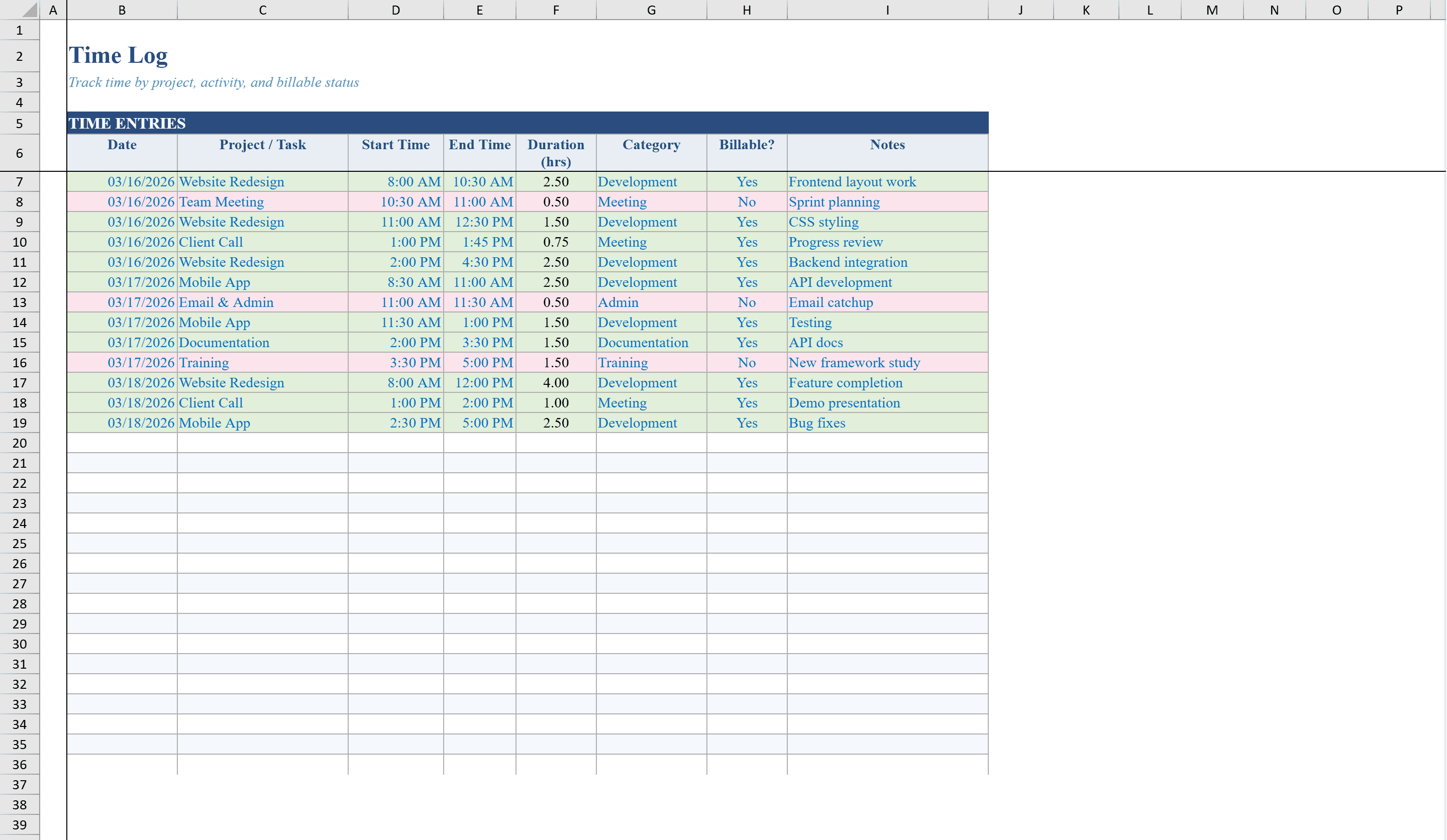
This time log template is a two-sheet Excel workbook built for freelancers, consultants, and project teams who need to track billable and non-billable hours. Log daily time entries with project name, start and end times, auto-calculated duration, activity category, and billable status across 30 rows. Dropdown lists ensure consistent data entry for projects, categories, and billing flags, while conditional formatting color-codes rows by billable status for quick scanning. The Summary sheet automatically aggregates hours by project with billable and non-billable breakdowns, calculates your billable percentage, and estimates revenue based on your hourly rate. When it is time to bill, feed your totals into the Invoice Tracking Template to manage receivables. A pie chart visualizes time allocation across projects.
Time Log Template Features
- 30 daily time entry rows with auto-calculated duration
- Dropdown lists for project, category, and billable status
- Color-coded rows by billable status for quick scanning
- Summary sheet with hours by project and billable percentage
- Pie chart visualizing time allocation across projects
How to Use This Time Log Template in Excel
- 1
Log time entries
Enter project name, start time, end time, activity category, and billable status for each work session.
- 2
Review durations
The template auto-calculates duration for each entry and color-codes rows by billable status.
- 3
Check project totals
View the Summary sheet for hours aggregated by project with billable and non-billable breakdowns.
- 4
Estimate revenue
Enter your hourly rate to see estimated revenue and your overall billable percentage.
Time Log Template FAQ
- How many time entries can I log?
- The template supports 30 daily time entry rows with auto-calculated durations, dropdown lists for consistent entry, and color-coded billable status.
- Does it calculate billable percentage?
- Yes, the Summary sheet automatically calculates your billable percentage and estimates revenue based on your hourly rate.
- Can I track multiple projects?
- Yes, dropdown lists let you assign entries to different projects, and the Summary sheet aggregates hours by project with billable and non-billable breakdowns.