May 2026
Shortcut Ranked Top Excel AI Agent Ahead of Claude for Excel by Ankura Office of the CFO
In an independent benchmark across three financial models, Shortcut ranked #1 overall among five Excel AI tools.
Independent benchmark
Shortcut ranks #1 as the top Excel AI agent for real finance work.
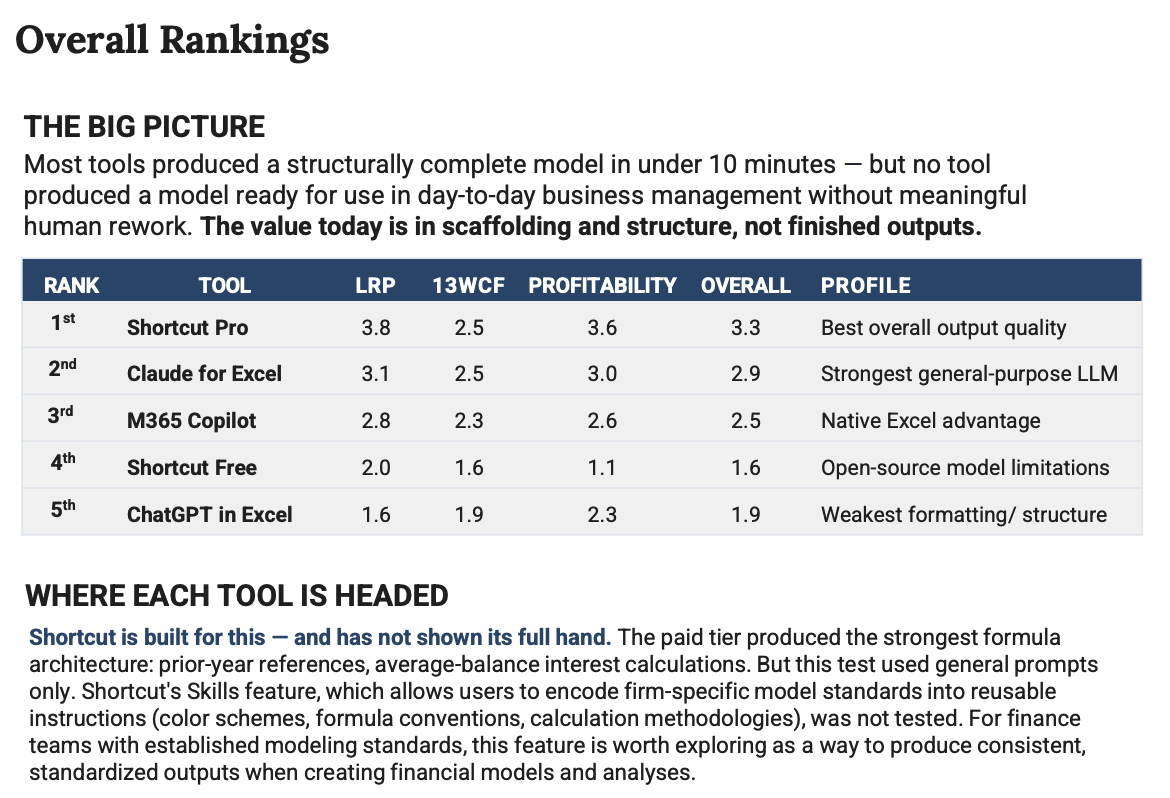
Ankura's Office of the CFO team tested five tools with identical prompts across a long-range plan, 13-week cash flow forecast, and customer profitability analysis. Shortcut Pro finished first overall, ahead of Claude for Excel, with the strongest aggregate output quality in the benchmark.
| Rank | Tool | LRP | 13WCF | Profitability | Overall | Profile |
|---|---|---|---|---|---|---|
| 1st | Shortcut Pro | 3.8 | 2.5 | 3.6 | 3.3 | Best overall output quality |
| 2nd | Claude for Excel | 3.1 | 2.5 | 3.0 | 2.9 | Strongest general-purpose LLM |
| 3rd | M365 Copilot | 2.8 | 2.3 | 2.6 | 2.5 | Native Excel advantage |
| 4th | Shortcut Free | 2.0 | 1.6 | 1.1 | 1.6 | Open-source model limitations |
| 5th | ChatGPT in Excel | 1.6 | 1.9 | 2.3 | 1.9 | Weakest formatting/structure |
Why this matters
Ankura still found that no AI tool produced a production-ready model without meaningful human review. That is the right bar: Shortcut is designed to be used iteratively across prompts, with analysts reviewing, refining, and compounding each step into stronger production-ready work faster than manual modeling alone.
The margin matters, too: the gap between Shortcut and Claude for Excel was the same as the gap between Claude for Excel and M365 Copilot in the overall rankings.
The free tier is a useful proof point too. Shortcut Free, powered by MiniMax for free users around the world, ranked ahead of ChatGPT in Excel, which is powered by GPT-5.5. The takeaway is that spreadsheet performance depends heavily on the surrounding agent harness: workbook context, tool use, planning, validation, and how changes are applied back into Excel.
The report also called out Shortcut Skills as a way for finance teams to encode firm-specific model standards, formula conventions, color schemes, and calculation methodologies into repeatable instructions.