Time Card Calculator
Accurately track hours, overtime, and pay for every employee in minutes.
About the Time Card Calculator
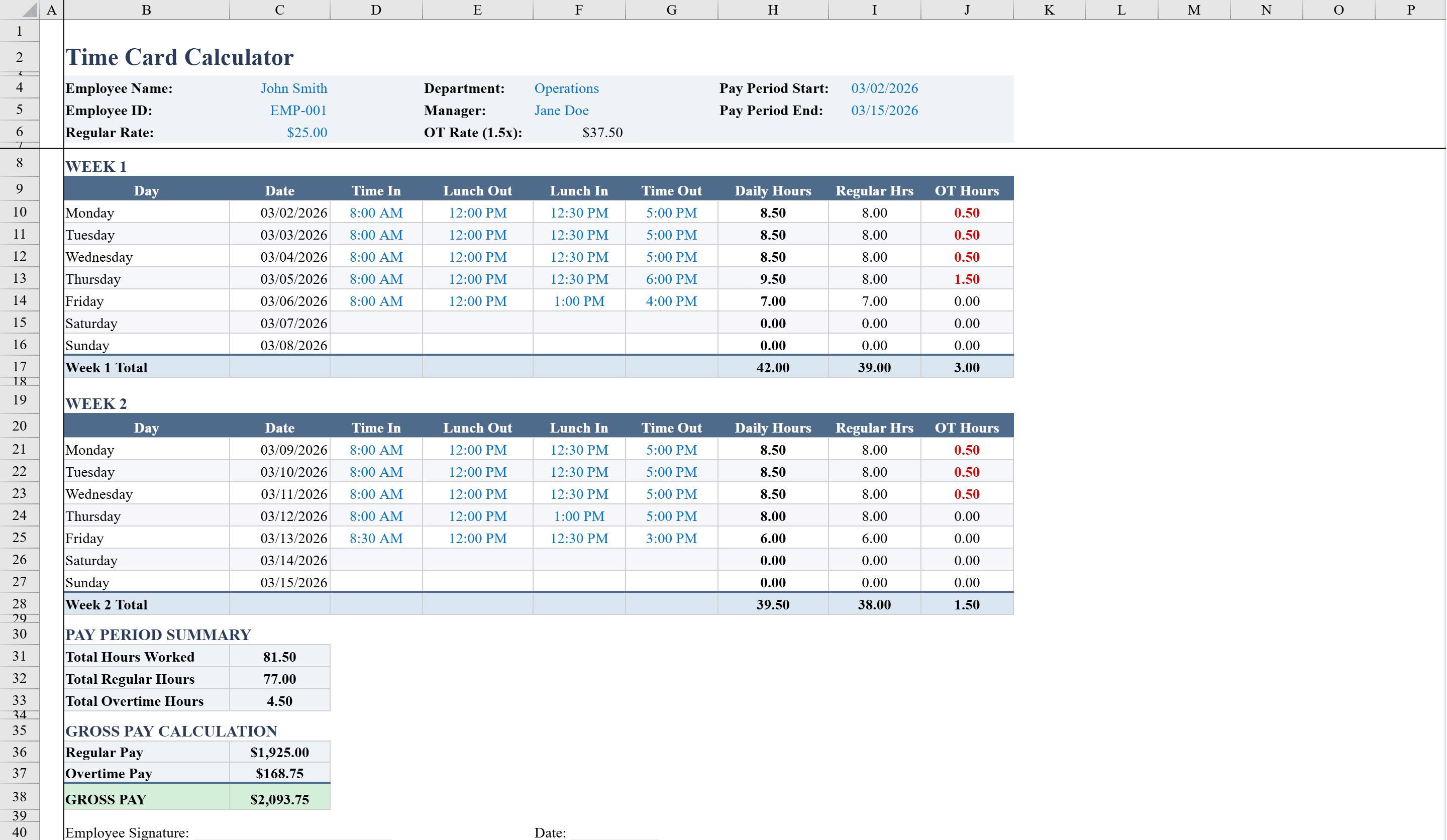
The Time Card Calculator is a complete Excel timesheet built for hourly employees and small business payroll. It covers a full two-week pay period with daily rows for clock-in, break start, break end, and clock-out times. Built-in formulas automatically compute daily total hours, separating regular time from overtime beyond 8 hours per day. Conditional formatting highlights overtime in bold red for easy identification. The template includes fields for employee name, manager, and hourly rate, with data validation ensuring all time entries are properly formatted. Weekly and biweekly totals calculate pay automatically. For a broader time-tracking workflow, see our timesheet template or pair this with the payroll template for end-to-end pay processing.
Time Card Calculator Features
- Full two-week pay period with daily clock-in, break, and clock-out fields
- Automatic daily total hours with regular and overtime separation
- Conditional formatting highlights overtime in bold red
- Employee name, manager, and hourly rate fields
- Data validation ensures properly formatted time entries
How to Use This Time Card Calculator in Excel
- 1
Enter employee details
Fill in the employee name, manager name, and hourly rate at the top of the template.
- 2
Log daily times
Enter clock-in, break start, break end, and clock-out times for each workday across the two-week period.
- 3
Review overtime flags
Check for bold red highlights that indicate days where overtime beyond 8 hours was worked.
- 4
Submit for approval
Review the weekly and biweekly pay totals, then print or share the completed time card for manager sign-off.
Time Card Calculator FAQ
- How does the time card calculator handle overtime?
- The template automatically separates regular hours from overtime beyond 8 hours per day. Overtime entries are highlighted in bold red for easy identification.
- Can I use this for weekly pay periods instead of biweekly?
- Yes, you can use just one week of the template for weekly pay periods. The weekly subtotals are calculated independently.
- Does the template calculate pay automatically?
- Yes, once you enter the hourly rate, the template automatically calculates regular pay, overtime pay, and total gross pay for the entire pay period.