Kanban Board Template
Visualize your workflow and spot bottlenecks before they stall the team.
About the Kanban Board Template
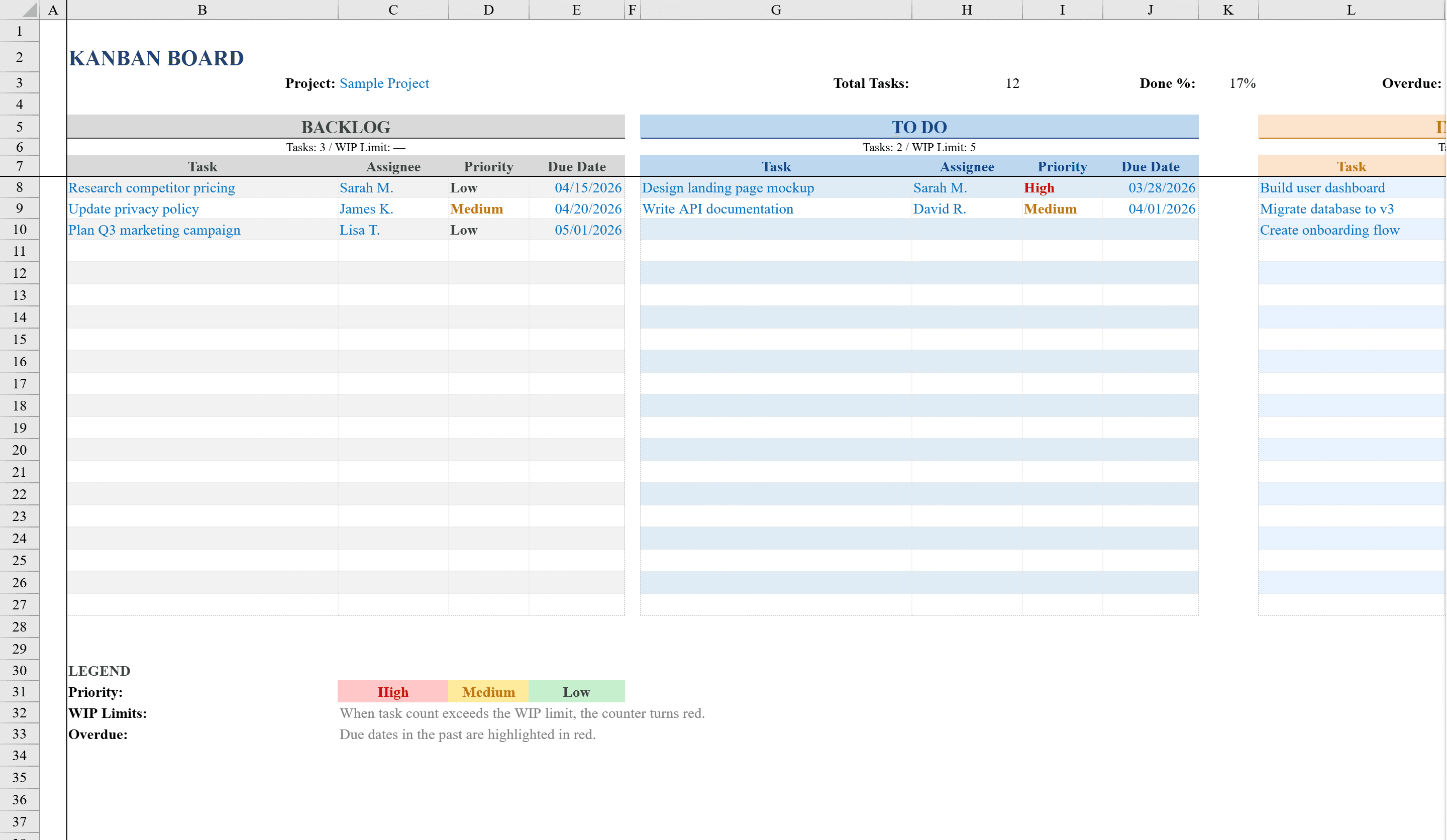
This Kanban Board Template for Excel provides a visual project management system with five workflow columns -- allowing teams to track tasks from backlog through completion. Designed for project managers and agile teams, it features built-in priority levels (High, Medium, Low) with color-coded conditional formatting, due date tracking that highlights overdue items in red, and automatic task counters for each stage. The board supports up to 20 tasks per column with dropdown-based priority selection and WIP limit alerts, making it easy to manage workflows, identify bottlenecks, and keep projects on track without specialized software. For timeline-based planning, try the Gantt chart template or decompose tasks further with a WBS template.
Kanban Board Template Features
- Five workflow columns tracking tasks from backlog through completion
- Color-coded priority levels (High, Medium, Low) with conditional formatting
- Due date tracking with overdue items highlighted in red
- Automatic task counters for each workflow stage
- WIP limit alerts to identify bottlenecks and manage flow
How to Use This Kanban Board Template in Excel
- 1
Add tasks to the backlog
Enter your project tasks in the backlog column with descriptions, priority levels, and due dates.
- 2
Move tasks through stages
As work progresses, move tasks across the five workflow columns from backlog to completion.
- 3
Monitor WIP limits
Watch for WIP limit alerts that flag when a column has too many active tasks, indicating a bottleneck.
- 4
Track overdue items
Review red-highlighted overdue tasks and use the automatic stage counters to monitor workflow health.
Kanban Board Template FAQ
- How many workflow stages does the Kanban board have?
- The template includes five workflow columns that track tasks from backlog through completion, with automatic task counters for each stage.
- What are WIP limit alerts?
- Work-in-progress (WIP) limit alerts notify you when a workflow column has too many active tasks, helping you identify bottlenecks and maintain steady flow.
- How many tasks can each column hold?
- Each column supports up to 20 tasks with dropdown-based priority selection, due dates, and color-coded conditional formatting.