Billing Statement Template
Give customers a transparent account summary that builds trust and gets balances settled.
About the Billing Statement Template
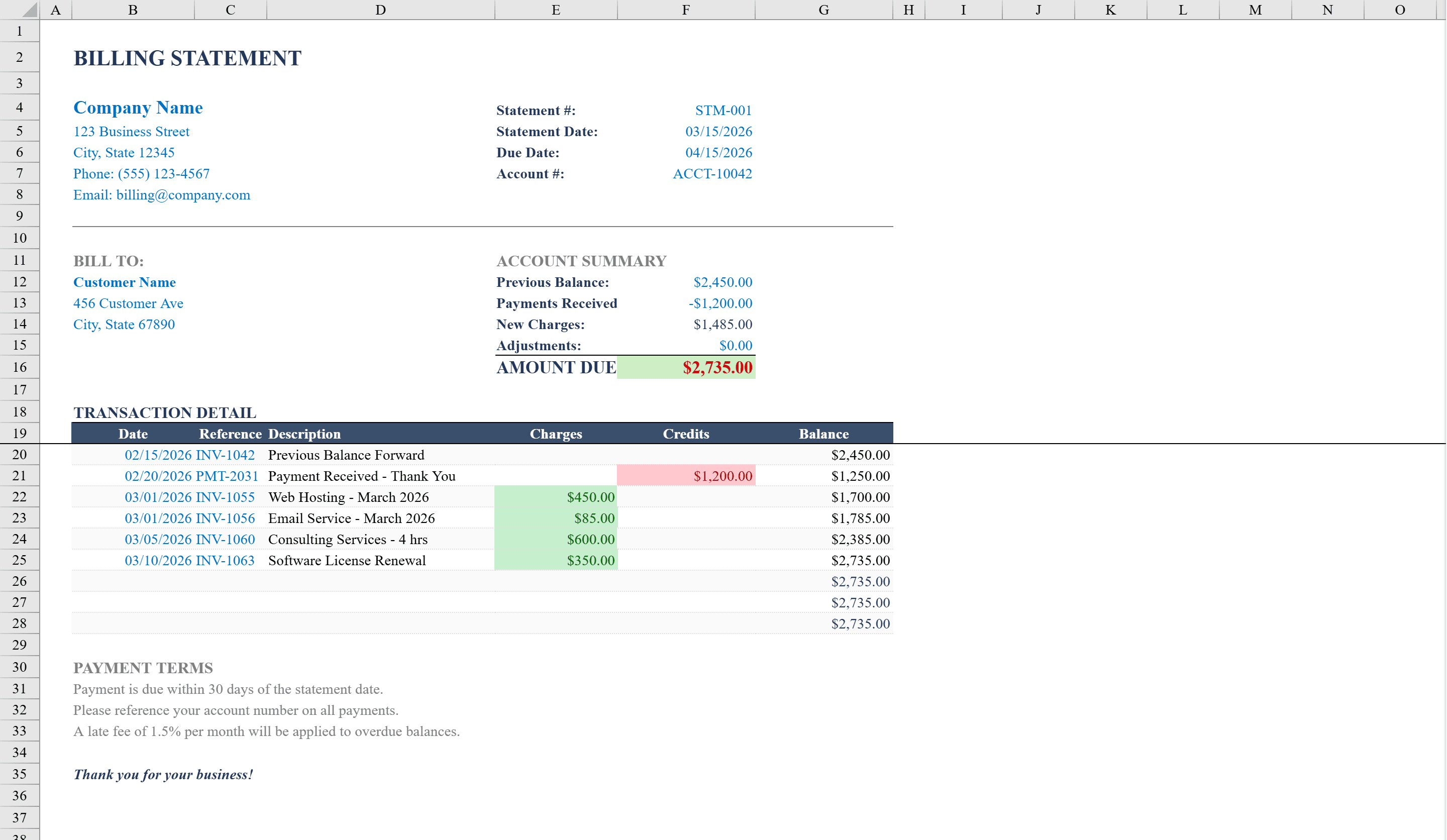
This Billing Statement Template is a professional, ready-to-send Excel workbook designed for small businesses, freelancers, and service providers who need to generate clear customer billing statements. It includes sections for company information, customer details, account summary with previous balance, payments received, new charges, and amount due. A transaction detail table tracks individual charges and credits with running balance calculations, while alternating row shading ensures readability. Conditional formatting highlights overdue amounts and distinguishes charges from credits. Built-in data validation ensures valid dates and positive amounts, and the layout is print-optimized for mailing or PDF export. Need to create the original bill? Start with the Invoice Template.
Billing Statement Template Features
- Account summary with previous balance, payments, new charges, and amount due
- Transaction detail table with running balance calculations
- Alternating row shading for readability
- Conditional formatting highlights overdue amounts and distinguishes charges from credits
- Print-optimized layout for mailing or PDF export
How to Use This Billing Statement Template in Excel
- 1
Enter company and customer info
Fill in your company details and the customer's name, address, and account number.
- 2
Set account summary
Enter the previous balance, payments received, and any new charges to calculate the amount due.
- 3
Add transaction details
Log individual charges and credits in the transaction table — running balances calculate automatically.
- 4
Print or export
Review the formatted statement and print or export as PDF using the optimized layout.
Billing Statement Template FAQ
- How does the running balance work?
- Each row in the transaction detail table automatically calculates a running balance by adding charges and subtracting credits from the previous line's balance.
- Can I distinguish between charges and credits visually?
- Yes, conditional formatting automatically highlights charges and credits in different colors, making it easy to scan the transaction history.
- Is this template suitable for recurring billing?
- Absolutely. Duplicate the sheet for each billing period and update the previous balance, new charges, and payments to generate a fresh statement each month.