Receipt Template
Issue professional payment receipts your customers can trust in seconds.
About the Receipt Template
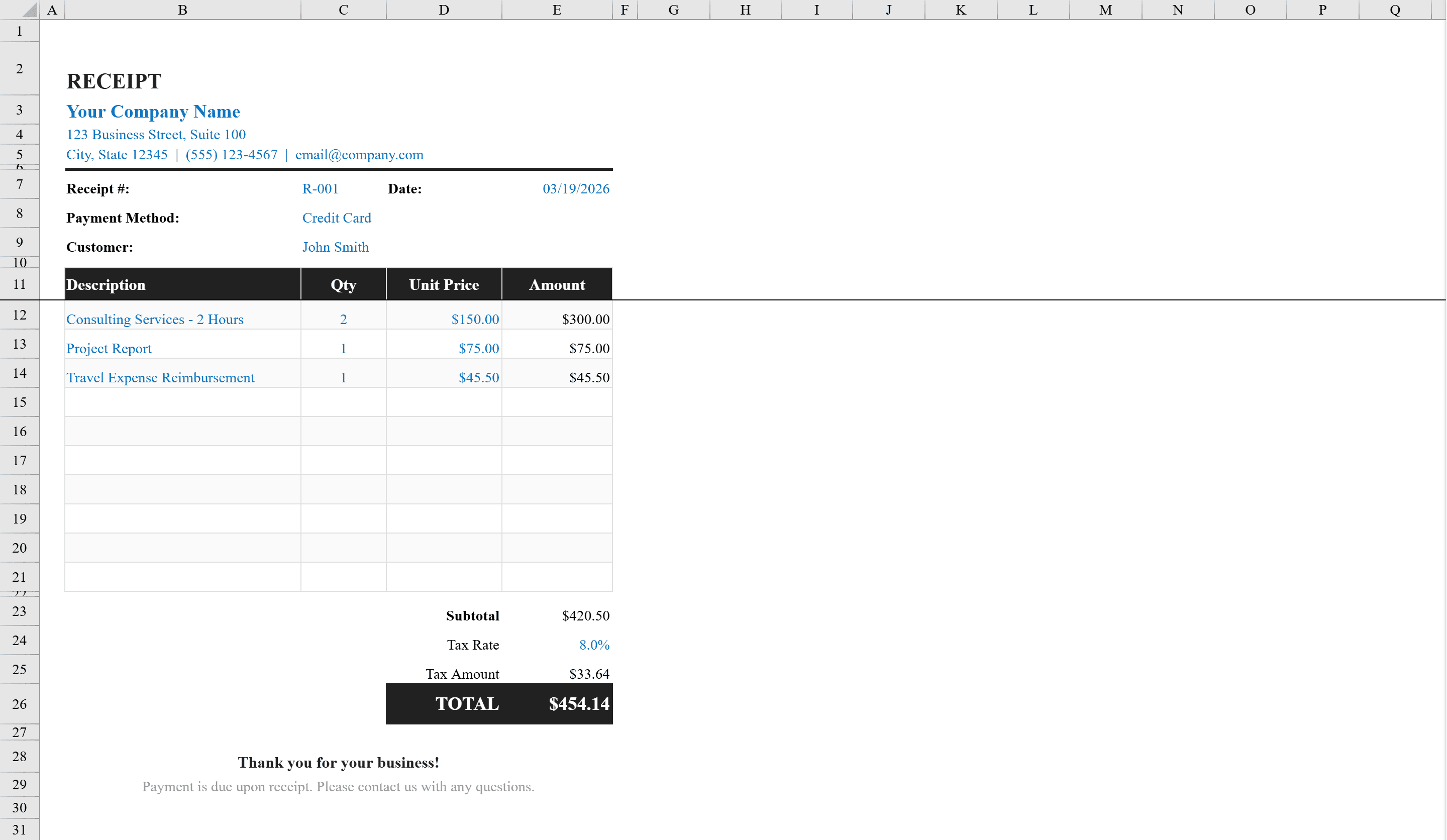
This professional receipt template provides a polished, ready-to-use format for issuing payment receipts to clients and customers. It includes fields for your company name and address, receipt number, date, payment method with a dropdown selector, and customer name. The itemized table supports up to ten line items with quantity, unit price, and auto-calculated amounts. Subtotal, configurable tax rate, tax amount, and grand total are computed automatically. Conditional formatting flags any negative amounts, and the layout includes a thank-you footer message. The template is print-ready with a defined print area. If you need to bill before collecting payment, start with our Invoice Template instead.
Receipt Template Features
- Itemized table supporting up to 10 line items with auto-calculated amounts
- Payment method dropdown selector for cash, card, and other methods
- Automatic subtotal, configurable tax rate, and grand total computation
- Conditional formatting flags negative amounts
- Print-ready layout with defined print area and thank-you footer
How to Use This Receipt Template in Excel
- 1
Enter business details
Add your company name, address, receipt number, and date at the top of the template.
- 2
Add customer and payment info
Enter the customer name and select the payment method from the dropdown menu.
- 3
List items
Enter up to 10 line items with quantity and unit price — amounts calculate automatically.
- 4
Print or export
Review the auto-calculated subtotal, tax, and grand total, then print using the defined print area.
Receipt Template FAQ
- How many line items can I include on a receipt?
- The template supports up to 10 line items, each with quantity, unit price, and auto-calculated amount fields.
- Can I change the tax rate?
- Yes, the tax rate is configurable. Simply update the tax percentage cell and the tax amount and grand total recalculate automatically.
- What payment methods are available in the dropdown?
- The dropdown includes common payment methods like cash, credit card, debit card, check, and bank transfer. You can customize the list to add other options.