Mileage Tracker
Accurately log every business and personal mile so you can maximize reimbursements and simplify tax season.
About the Mileage Tracker
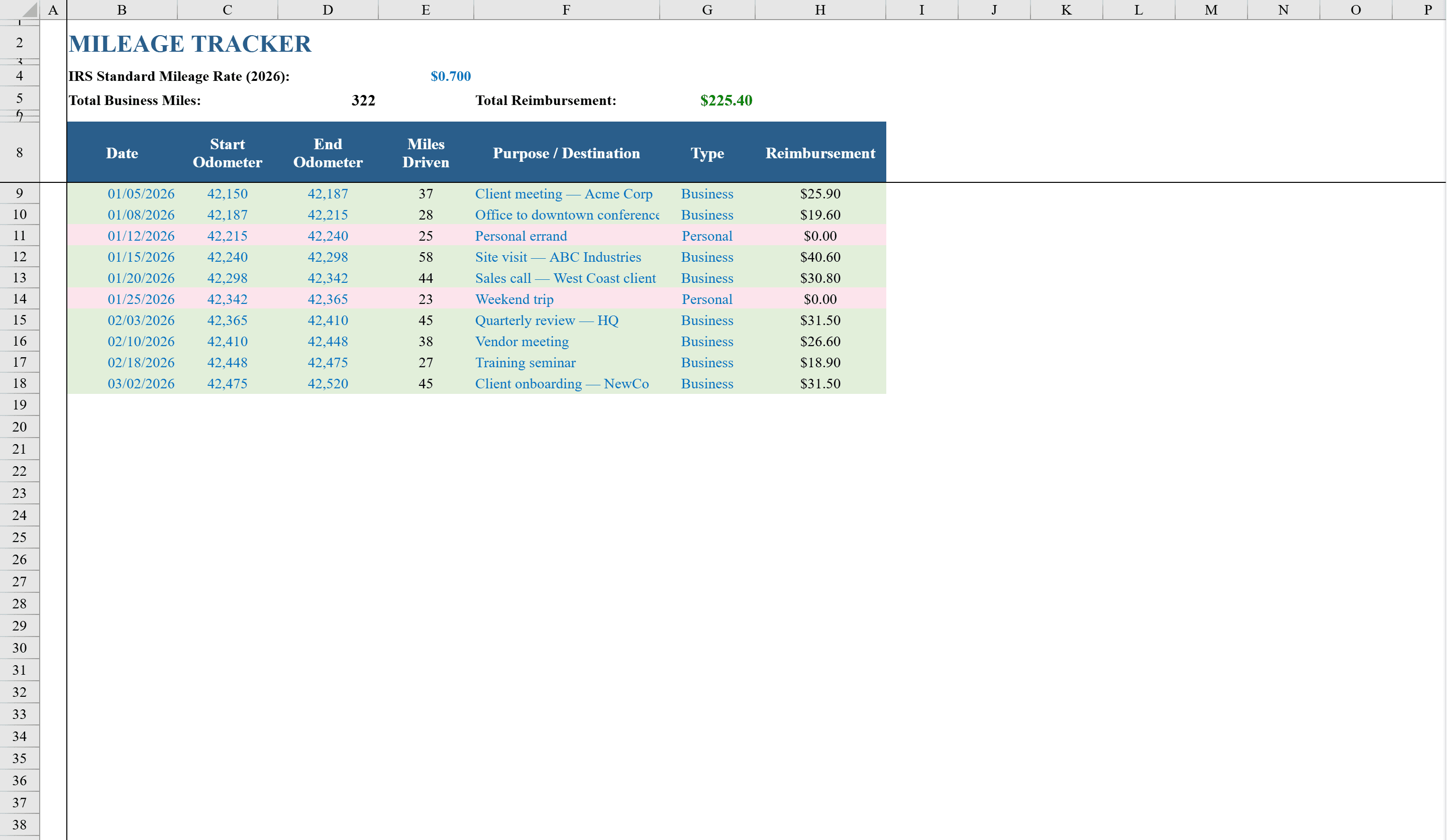
This Mileage Tracker Template for Excel is designed for employees, freelancers, and business owners who need to log and categorize driving miles for expense reimbursement or tax deductions. The Mileage Log sheet records date, start and end odometer readings, destination, trip purpose, and automatically calculates distance and reimbursement using a configurable rate per mile. Business and personal trips are color-coded with conditional formatting for easy visual separation. A Monthly Summary sheet aggregates business and personal miles by month with automatic reimbursement totals, accompanied by a bar chart showing monthly mileage trends across the year. Use it alongside a vacation tracker to keep all employee time and travel records in one place.
Mileage Tracker Features
- Mileage log with date, odometer readings, destination, and trip purpose
- Automatic distance and reimbursement calculations at configurable rate
- Color-coded business vs. personal trips via conditional formatting
- Monthly summary sheet with aggregated business and personal miles
- Bar chart showing monthly mileage trends across the year
How to Use This Mileage Tracker in Excel
- 1
Configure your mileage rate
Set the reimbursement rate per mile at the top of the Mileage Log sheet. This rate is used in all automatic reimbursement calculations.
- 2
Log each trip
Enter the date, start and end odometer readings, destination, and trip purpose. Distance and reimbursement calculate automatically.
- 3
Categorize trips
Mark each trip as business or personal. Conditional formatting color-codes entries for easy visual separation.
- 4
Review monthly summaries
Check the Monthly Summary sheet for aggregated mileage and reimbursement totals by month, with a bar chart showing annual trends.
Mileage Tracker FAQ
- What mileage rate does this template use?
- The reimbursement rate is fully configurable. Set it to the current IRS standard mileage rate or your company's custom rate — all calculations update automatically.
- Can I use this mileage tracker for tax deductions?
- Yes. The template records all IRS-required details including date, destination, trip purpose, and miles driven. Export or print the log as supporting documentation for your tax return.
- Does it separate business and personal miles?
- Yes. Each trip is categorized as business or personal with color-coded conditional formatting. The Monthly Summary sheet provides separate totals for each category.