Expense Report Template
Submit organized expense reports with automatic category totals and receipt tracking.
About the Expense Report Template
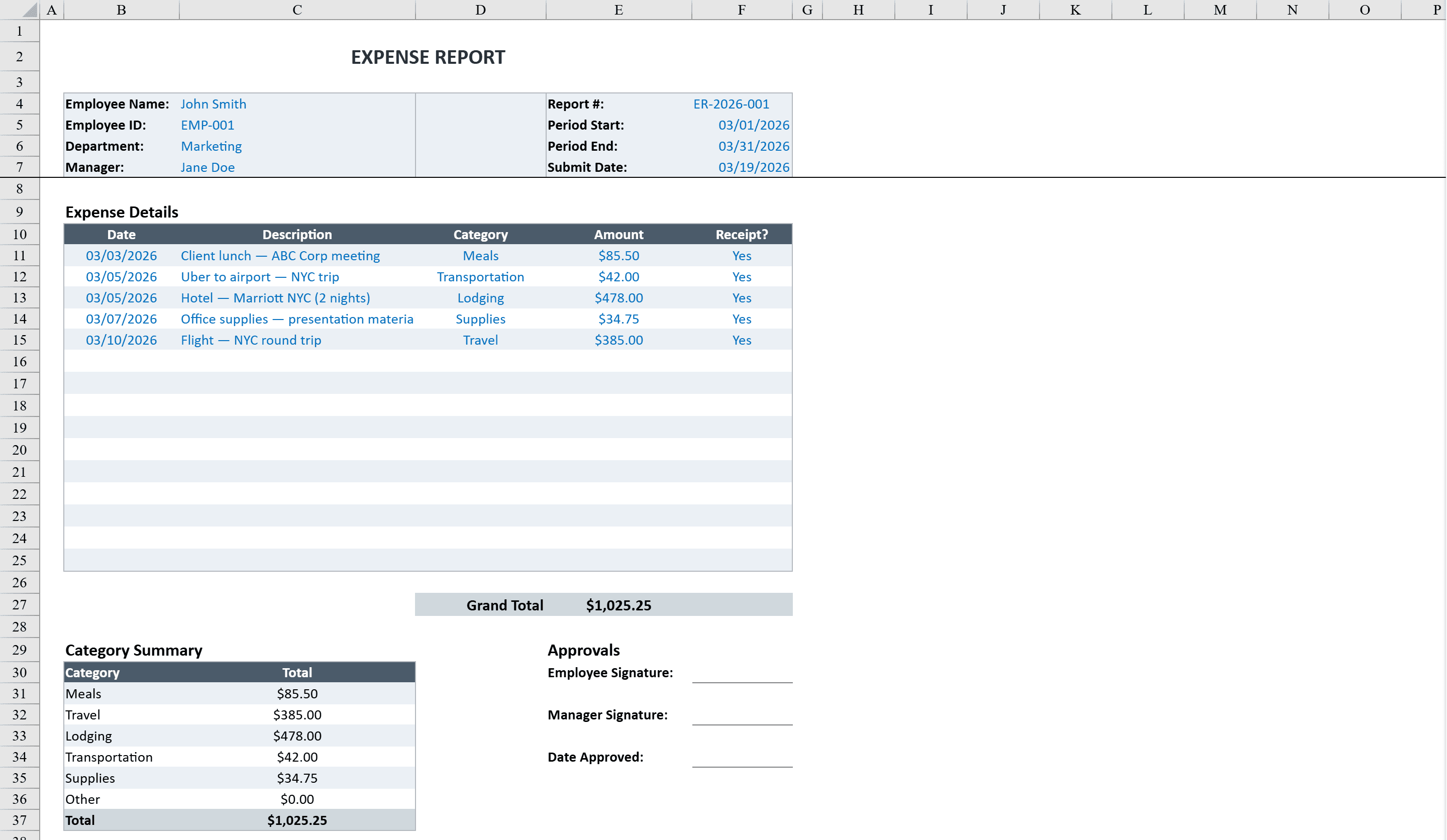
This expense report template streamlines business travel and expense reimbursement for employees and finance teams. It features a professional header with employee details, department, manager, and reporting period, followed by a categorized expense table with 15 rows for date, description, category, amount, and receipt tracking. Built-in SUMIF formulas generate an automatic category summary breaking down totals for meals, travel, lodging, transportation, supplies, and other expenses. Conditional formatting flags missing receipts and high-value expenses, while dropdown menus for category and receipt status ensure consistent data entry. Includes signature lines for employee and manager approvals. If you also need to reimburse via invoice, the simple invoice template pairs well for processing approved expenses.
Expense Report Template Features
- Professional header with employee details, department, and reporting period
- 15-row categorized expense table with date, description, category, and amount
- Automatic SUMIF category summary for meals, travel, lodging, and more
- Conditional formatting flags missing receipts and high-value expenses
- Signature lines for employee and manager approvals
How to Use This Expense Report Template in Excel
- 1
Fill in employee details
Enter your name, department, manager, and the reporting period at the top of the expense report.
- 2
Log each expense
Record up to 15 expenses with date, description, category from the dropdown, amount, and receipt status.
- 3
Review category summary
Check the automatic SUMIF category breakdown showing totals for meals, travel, lodging, and other categories.
- 4
Submit for approval
Print or share the completed report with signature lines for both employee certification and manager approval.
Expense Report Template FAQ
- What expense categories are included?
- The template includes categories for meals, travel, lodging, transportation, supplies, and other expenses, all selectable from dropdown menus.
- How does the receipt tracking work?
- Each expense row includes a receipt status field with dropdown options. Conditional formatting automatically flags entries with missing receipts.
- Does it calculate totals by category?
- Yes, built-in SUMIF formulas automatically generate a category summary that breaks down total spending for each expense type.