Earned Value Management
Measure project health against both schedule and budget baselines so you can course-correct before small variances become major overruns.
About the Earned Value Management
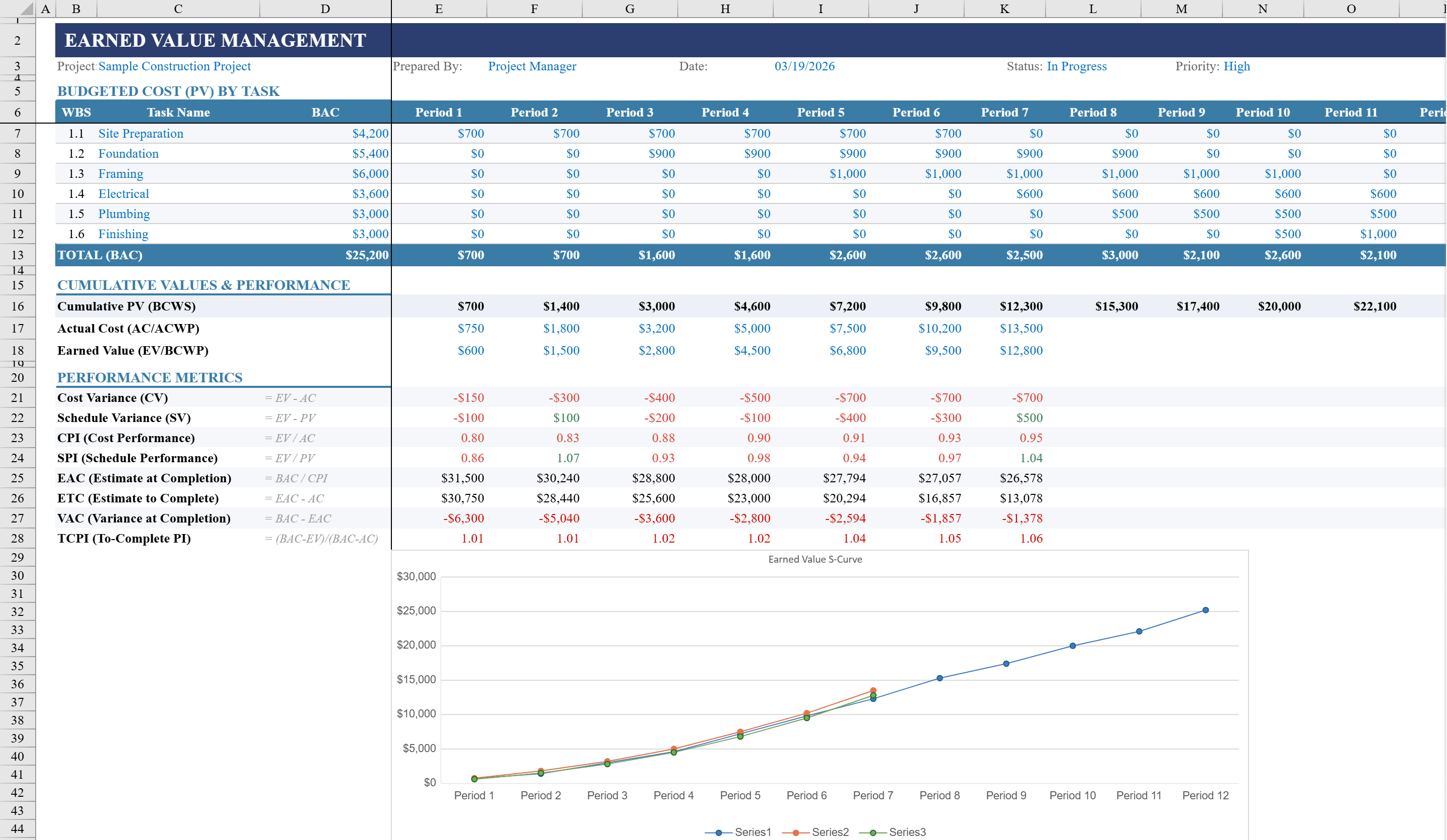
Monitor project health against budget and schedule baselines using this Earned Value Management Template for Excel. Built for project managers, PMO analysts, and project controllers, this two-sheet workbook tracks Planned Value, Actual Cost, and Earned Value across 12 reporting periods with automatic calculation of key EVM metrics including Schedule Variance, Cost Variance, SPI, CPI, Estimate at Completion, and Variance at Completion. Conditional formatting color-codes performance indicators in green or red for instant status assessment. An integrated S-Curve line chart visualizes PV, AC, and EV trends. Includes an Instructions sheet and dropdown fields for project status and risk level. Pair it with a critical path template for schedule network analysis or a project budget for detailed cost breakdowns.
Earned Value Management Features
- Tracks Planned Value, Actual Cost, and Earned Value across 12 periods
- Auto-calculates SV, CV, SPI, CPI, EAC, and VAC metrics
- Conditional formatting color-codes performance indicators green or red
- Integrated S-Curve line chart visualizing PV, AC, and EV trends
- Instructions sheet and dropdown fields for project status and risk level
How to Use This Earned Value Management in Excel
- 1
Set the project baseline
Enter Planned Value for each of the 12 reporting periods to establish the budget baseline (Budget at Completion).
- 2
Record actual costs and progress
Input Actual Cost and Earned Value for each period as the project progresses. EVM metrics calculate automatically.
- 3
Monitor performance indicators
Review SPI, CPI, Schedule Variance, and Cost Variance. Green indicates on or ahead of plan; red signals schedule or cost overruns.
- 4
Analyze the S-Curve chart
Use the S-Curve to visualize how PV, AC, and EV lines diverge over time, revealing trends in project performance.
Earned Value Management FAQ
- What is Earned Value Management?
- EVM is a project management methodology that compares planned work (PV), completed work value (EV), and actual cost (AC) to measure project performance against both schedule and budget baselines.
- What do SPI and CPI mean?
- Schedule Performance Index (SPI) = EV/PV measures schedule efficiency. Cost Performance Index (CPI) = EV/AC measures cost efficiency. Values above 1.0 indicate ahead of schedule or under budget.
- Can I add more than 12 reporting periods?
- Yes. Extend the columns to add more periods. All EVM formulas, the S-Curve chart, and conditional formatting will update to include the additional periods.