January 2026
10 Reasons Why Teams Choose Shortcut Over Claude for Excel
Claude launched their Excel agent in early 2026. Here's why enterprise teams still choose Shortcut for a full day of real spreadsheet work.

Accuracy on Complex, Real-World Work
Claude routinely outperforms Microsoft's Copilot Agent Mode and a variety of follow-on startups (Endex, Tracelight, Compound, etc.), but falls short against Shortcut in specific ways outlined below. On simple tasks, the accuracy difference isn't immediately obvious—it's during large, multi-turn, or complex real-world tasks where the gap becomes clear.
- -Extracts numbers from complex tables, footnotes, exhibits, scanned documents, and embedded images with higher accuracy
- -Preserves number formatting, currency symbols, and decimal precision automatically
- -Maintains consistency across multi-step workflows where errors compound over time
Mean Accuracy Score
n=4 benchmark tasks
Google/Meta Combination
Multi-company financial modeling
Payout Structure Math
Complex waterfall calculations
Hedge Fund Model Correction
Large model completion from associated workbooks
Roblox 10-K Extraction
Embedded image extraction
Roblox 10-K Financial Extraction Comparison
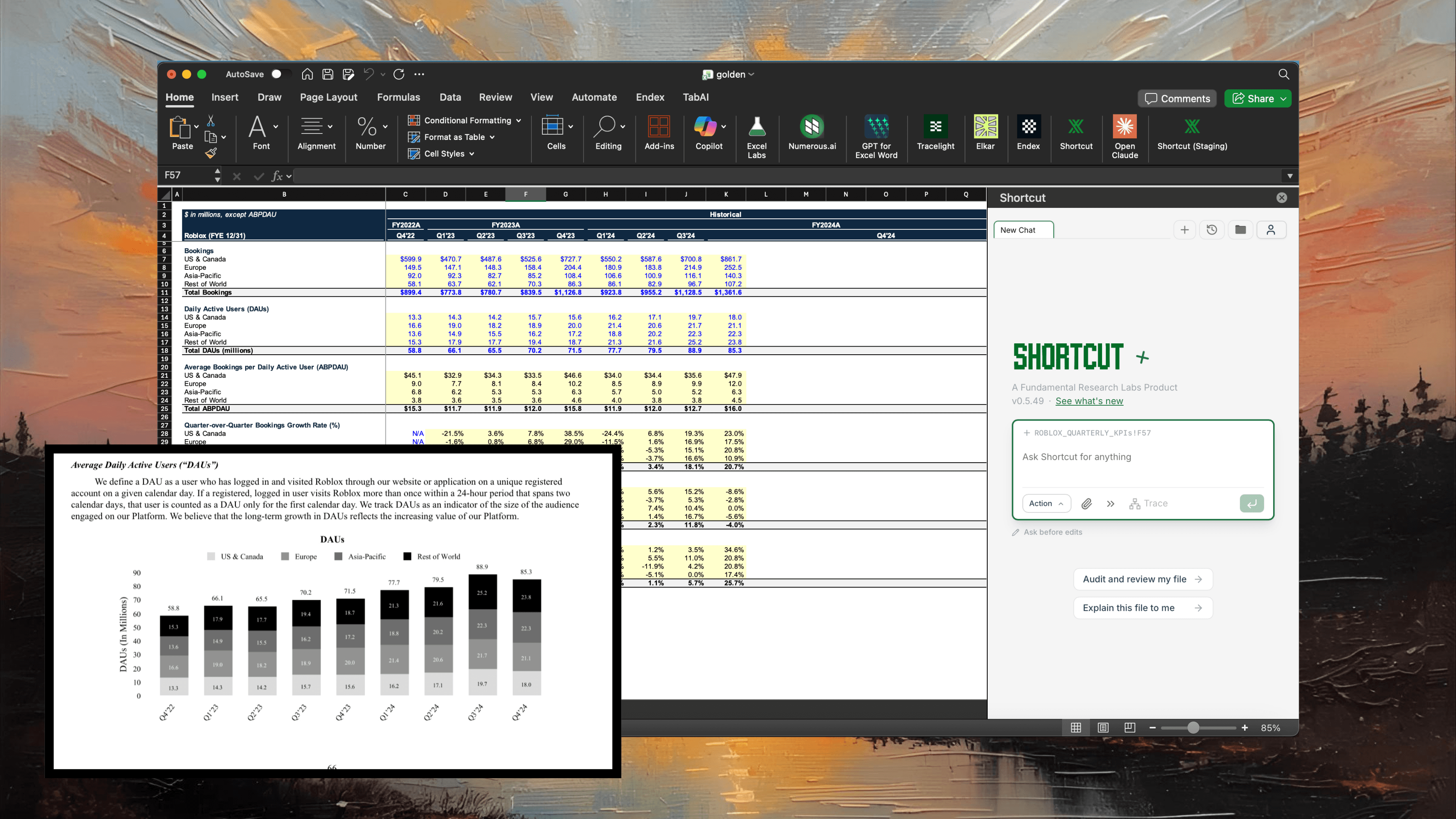
Fill out historical sections using Roblox 2024 10-K. Don't change unshaded or pre-filled cells. Note that the growth rates are calculated on a quarter-over-quarter basis.
To complete this task, the agent must first locate and download the actual 10-K filing from the SEC. Only Shortcut has the ability to download SEC files directly to its own environment. Other agents must rely on supplemental web search, which returns incomplete or reformatted data. Even if we manually attach the 10-K PDF to help Claude, it still only achieves ~40% accuracy because the Roblox 10-K uses embedded images of charts instead of text-based tables.
┌────────────────────────────────────┐
│       SHORTCUT WORKFLOW            │
├────────────────────────────────────┤
│ Prompt                             │
│   ▼                                │
│ Search SEC EDGAR                   │
│   ▼                                │
│ Download 10-K PDF directly         │
│   ▼                                │
│ ┌────────────────────────────┐     │
│ │ Custom Extraction Pipeline │     │
│ │ • Text tables & footnotes  │     │
│ │ • Embedded chart images    │     │
│ │ • Graphs & visualizations  │     │
│ └────────────────────────────┘     │
│   ▼                                │
│ Extract exact numbers ──▶ Excel    │
│                                    │
│ Result: 100% accuracy              │
└────────────────────────────────────┘
┌────────────────────────────────────┐
│   CLAUDE (no file access)          │
├────────────────────────────────────┤
│ Prompt                             │
│   ▼                                │
│ Web search                         │
│   ▼                                │
│ Third-party summaries              │
│ (reformatted/incomplete)           │
│   ▼                                │
│ Guesses or refuses to proceed      │
│   ▼                                │
│ Excel                              │
│                                    │
│ Result: ~9% accuracy               │
└────────────────────────────────────┘
┌────────────────────────────────────┐
│   CLAUDE (with PDF attached)       │
├────────────────────────────────────┤
│ Prompt + PDF attachment            │
│   ▼                                │
│ Read PDF contents                  │
│   ▼                                │
│ ✓ Can extract text tables          │
│ ✗ Cannot read embedded images      │
│ ✗ Cannot read charts as images     │
│   ▼                                │
│ Partial extraction ──▶ Excel       │
│                                    │
│ Result: ~40% accuracy              │
└────────────────────────────────────┘
Auditability
Even with higher accuracy, Shortcut goes further. It leaves comments with citations, auto-opens source PDFs to show you the exact reference, and lets you roll back to any action to see the before and after. Every change is non-destructive.
- -Cells with assumptions or data extractions can include a comment citing the exact source document and page
- -Auto-opens the source PDF and highlights the exact text or table referenced
- -Roll back to any action to see before and after states instantly
- -Both Shortcut and Claude ask for permissions before making changes—but only Shortcut previews changes on the spreadsheet and provides a list of all relevant cells being modified
- -Complete audit trail for compliance and review workflows
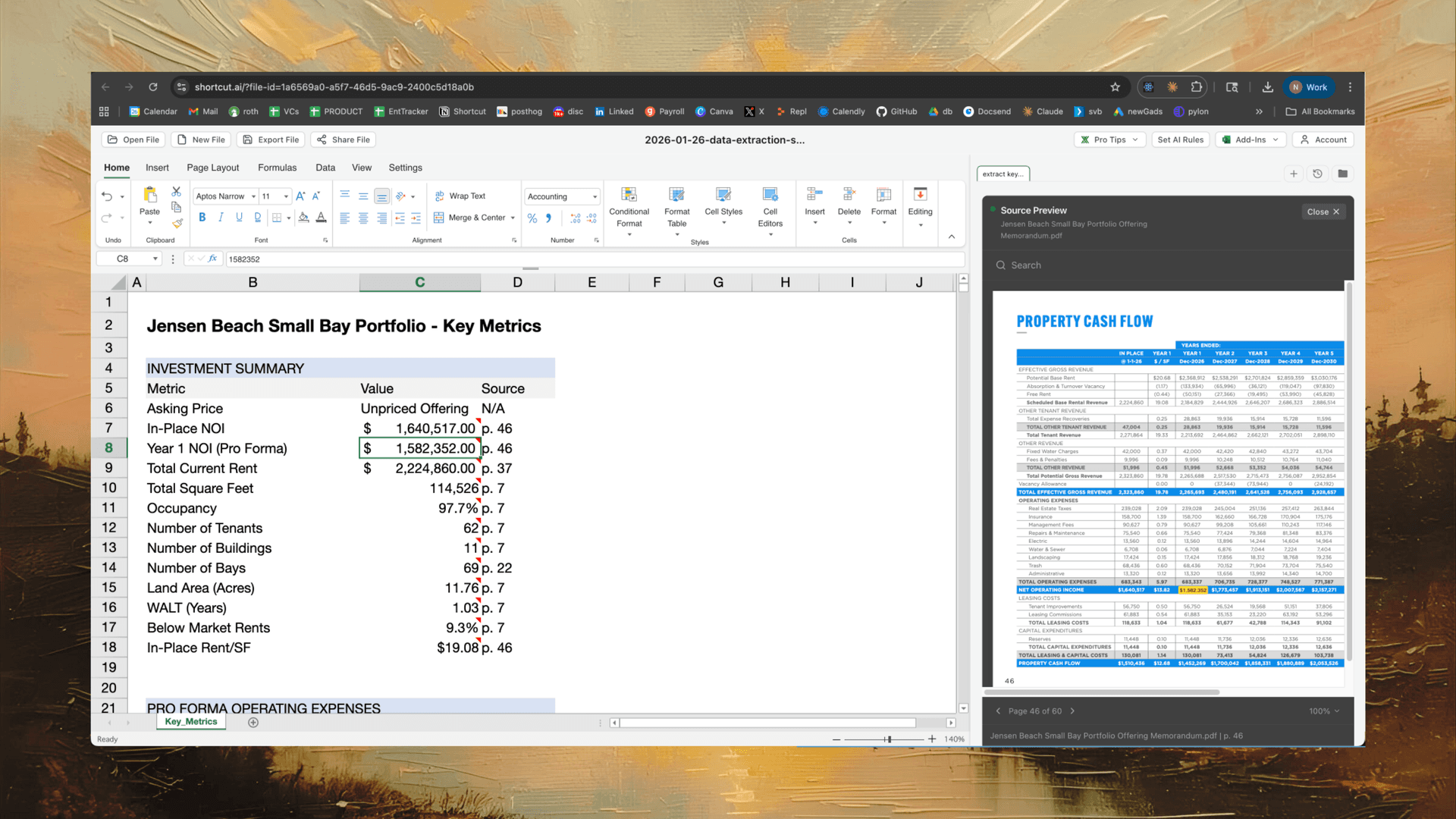
Auto-opens the source PDF to the exact page for verification
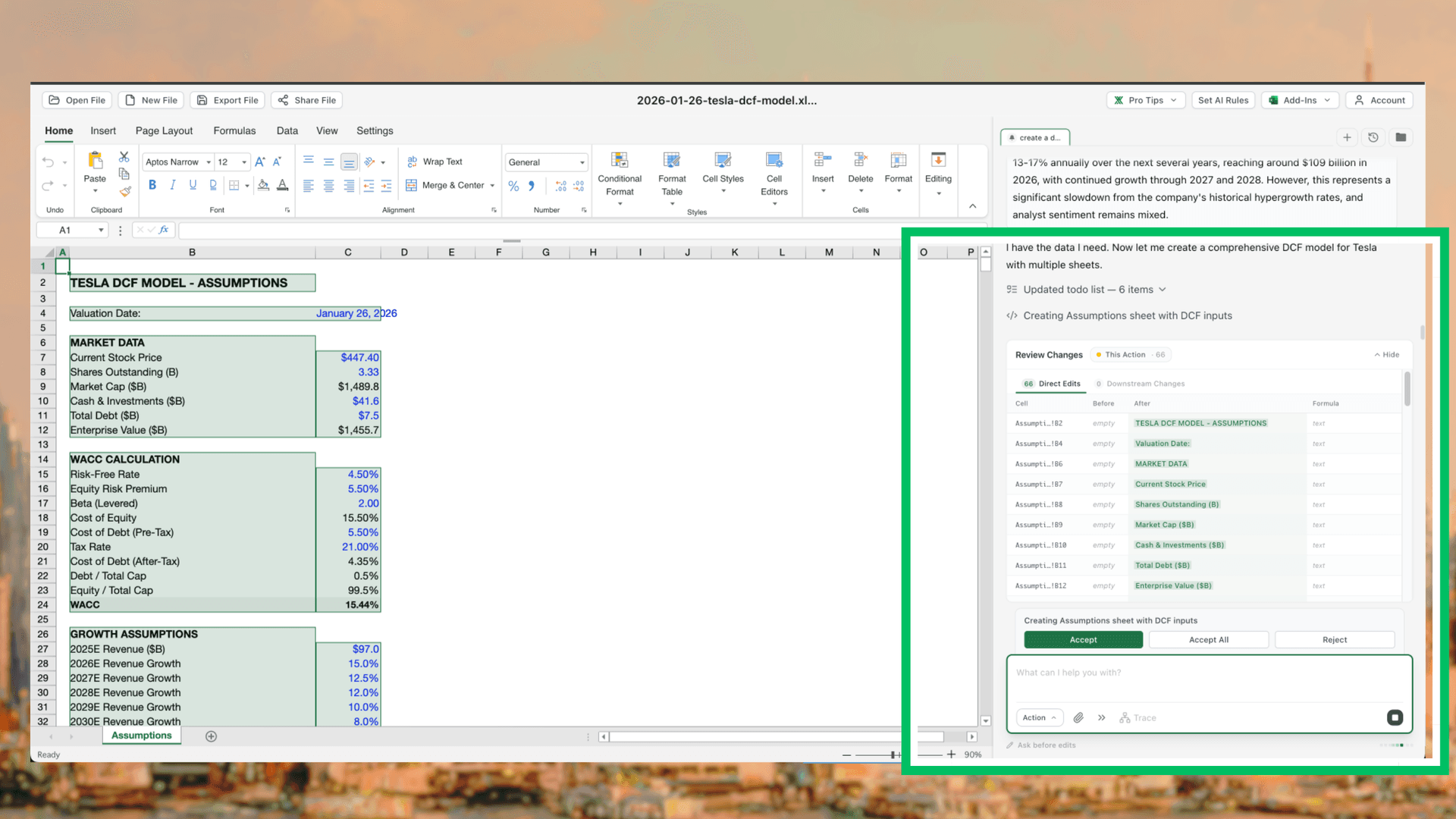
Previews every cell change before applying
Enterprise Customization for Workflows (Skills) and Company Preferences
At Shortcut, we understand that every team is unique in their preferences and needs. Teams can set global AI preferences for how they prefer to handle the intricate details in their models\u2014like formula preferences between XLOOKUP or INDEX MATCH, lambdas, etc., or how to handle named ranges and merged cells. We also allow teams to build custom and repeatable workflows\u2014for example, how a private equity firm likes the logic and structure of their LBO models to flow.
- -Build workflows that follow exact patterns, then trigger them by simply @mentioning in Shortcut
- -Set custom rules: avoid named ranges, prohibit merged cells, use XLOOKUP instead of VLOOKUP, enforce IB formatting standards
- -Claude does not yet let you configure custom rules or routine automations
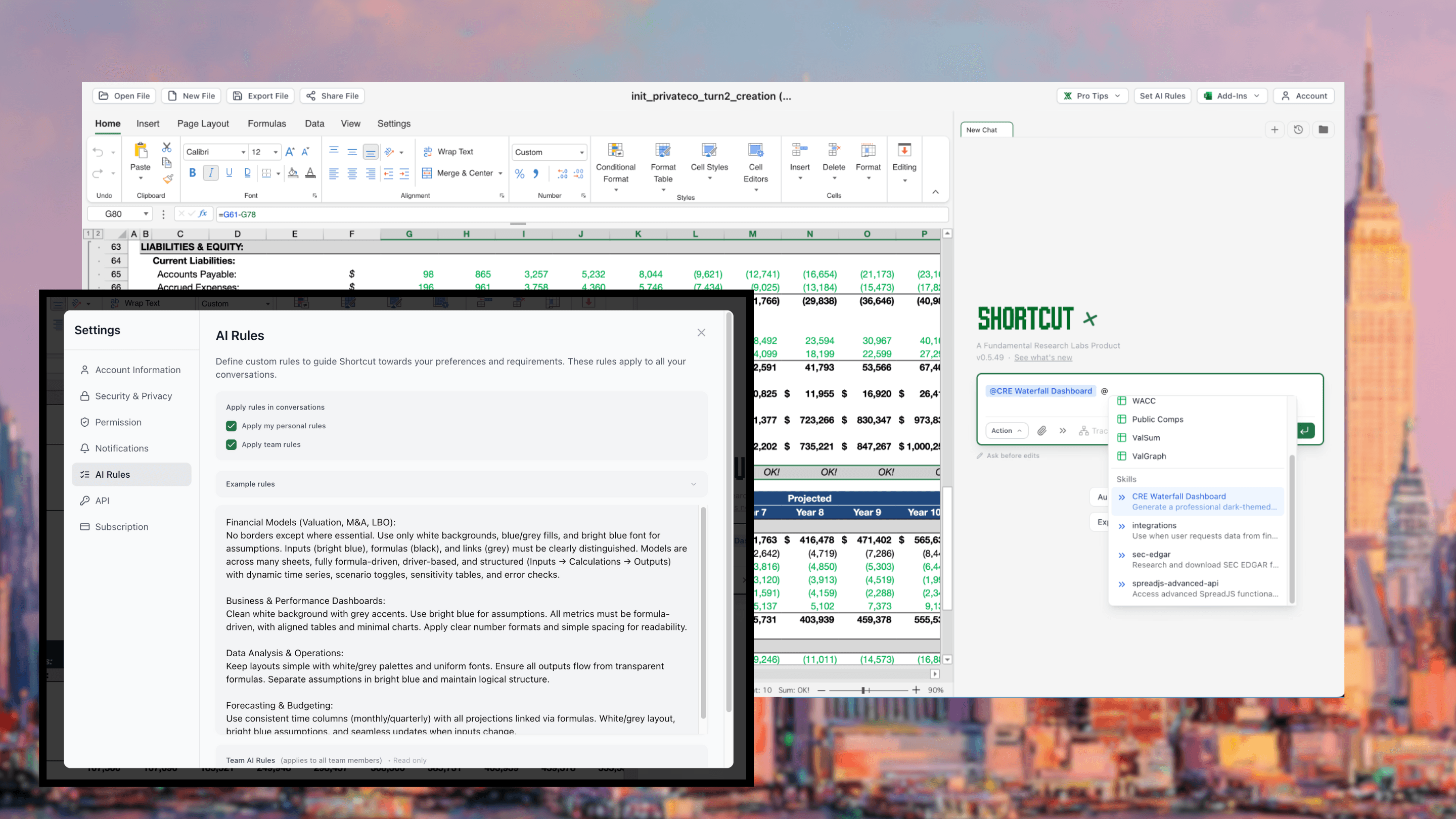
Configure custom AI rules for your team and build reusable workflow automations (AI Skills) that can be triggered with a simple @mention
Shortcut's Unmatched Attachment and File Support
Shortcut supports file attachments up to 250MB—8x larger than Claude's 30MB limit—and accepts all relevant spreadsheet attachment file types including zip folders. This means you can work with large, realistic files like 10-Ks, general ledgers, or investment memos without hitting arbitrary limits.
- -250MB file limit vs Claude's 30MB—8x more capacity for real enterprise files
- -Process 300,000+ row general ledgers, full 10-K filings, and investment memos
- -Some startup competitors don't even allow a single Excel attachment (Tracelight)
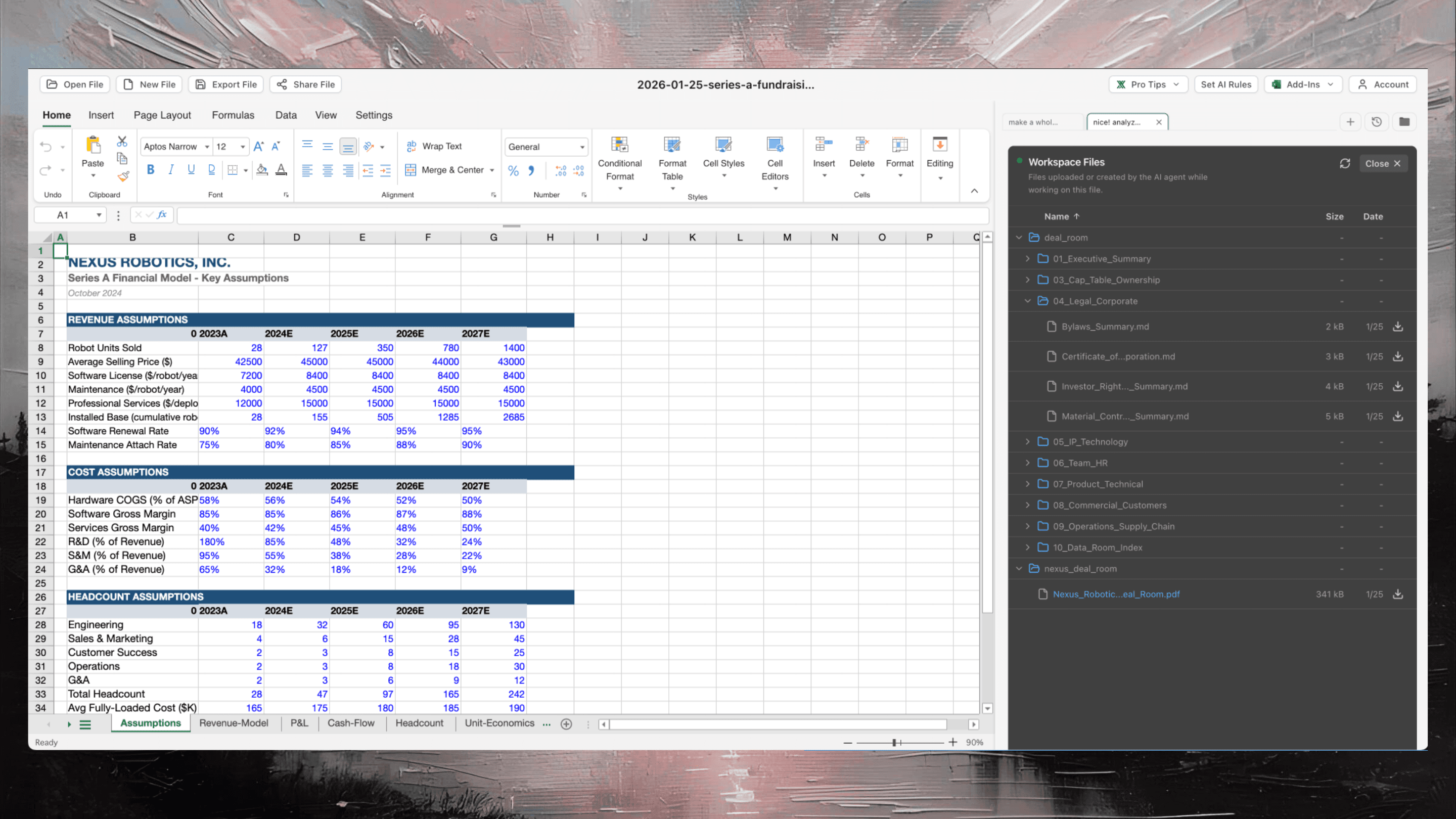
Shortcut handles a full zip folder with 30+ documents\u2014all readily available for the agent to work with
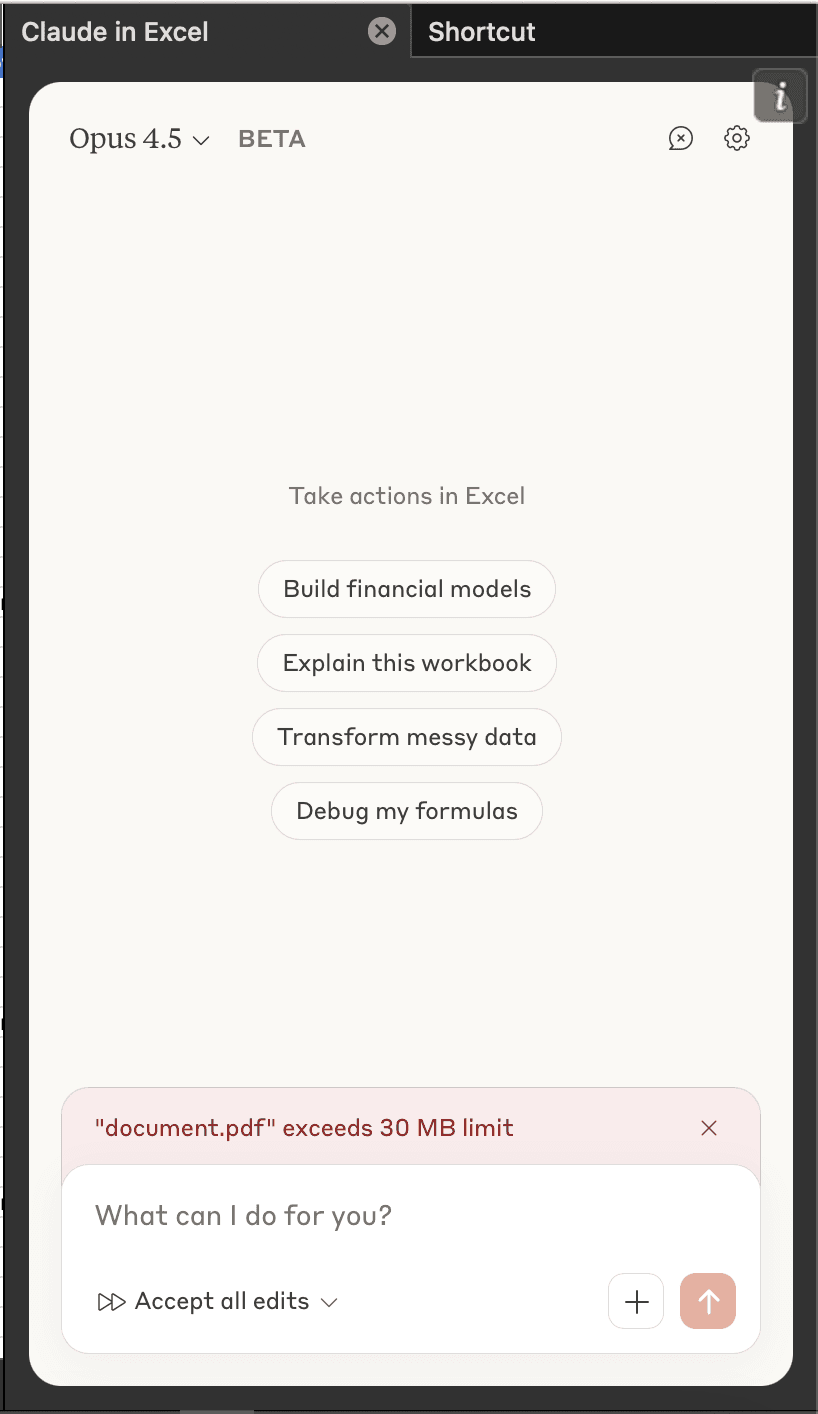
Claude fails when files exceed 30MB
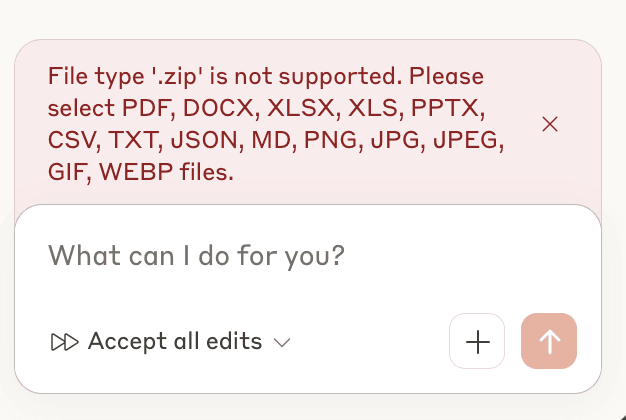
Claude cannot process zip folder attachments
Create PDFs and PowerPoints
Shortcut is the only Excel AI agent that can create other files. Create PDFs and PowerPoints with professional polish to accompany your projects and deals.
- -Generate presentation-ready PowerPoints and formatted PDF reports from your Excel models
- ↳Create custom workflows (Skills) to define your PPT and PDF preferences too
- -Automate the entire workflow from data analysis to final deliverable
- -Claude for Excel is limited to spreadsheet operations and cannot create PDFs or PowerPoints
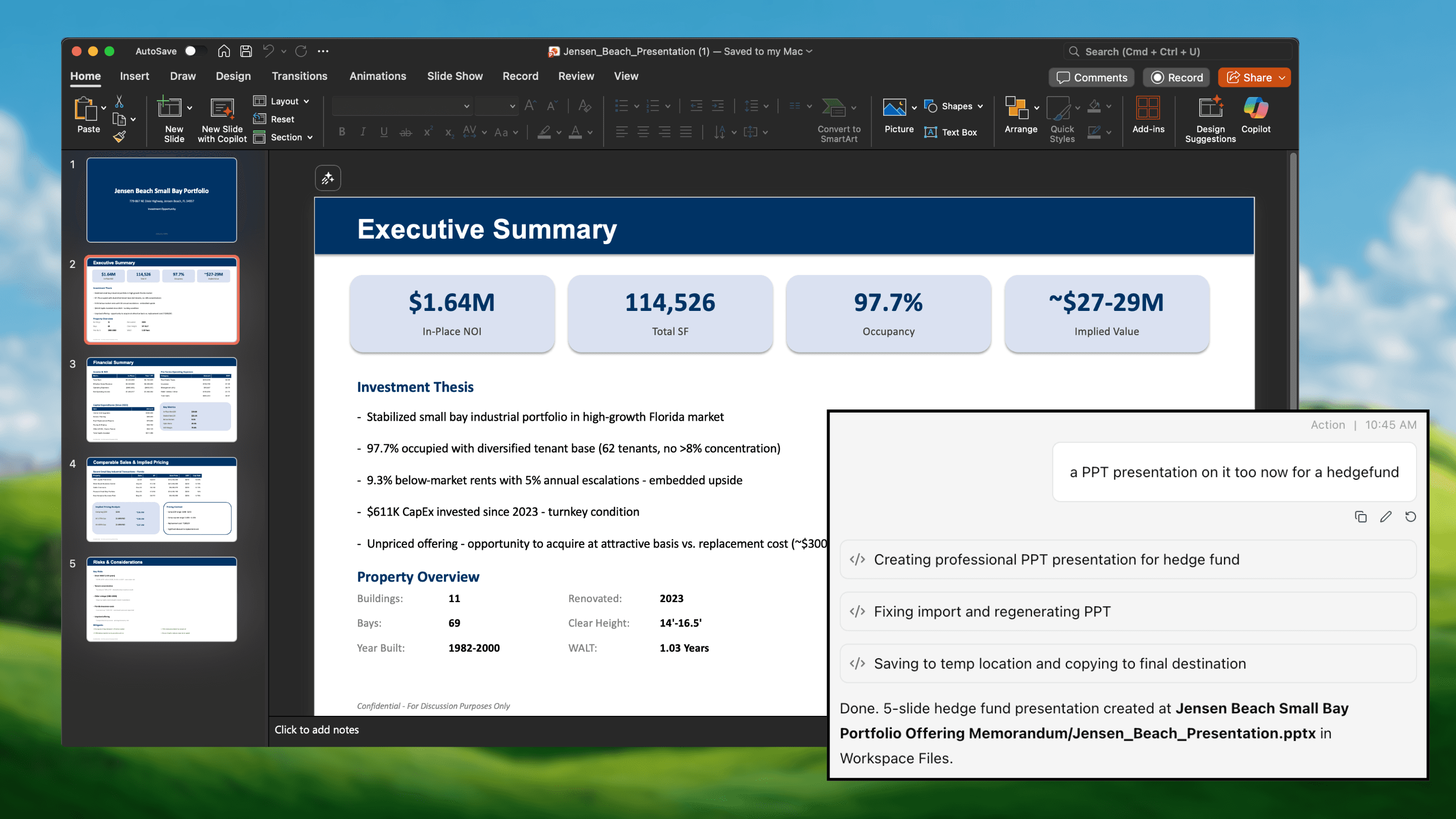
Generate polished PDFs and PowerPoints directly from your spreadsheet data
Plan Mode
Shortcut automatically switches into Plan Mode for complex or ambiguous asks, removing the uncertainty from prompts to significantly improve accuracy. Shortcut will even make recommendations and provide pros and cons to different approaches before you commit.
- -Automatically activates for complex, multi-step, or ambiguous requests
- -Presents multiple approaches with pros and cons for each option
- -Review and approve the plan before any changes are made to your workbook
- -Claude executes immediately without planning—no visibility into approach or alternatives
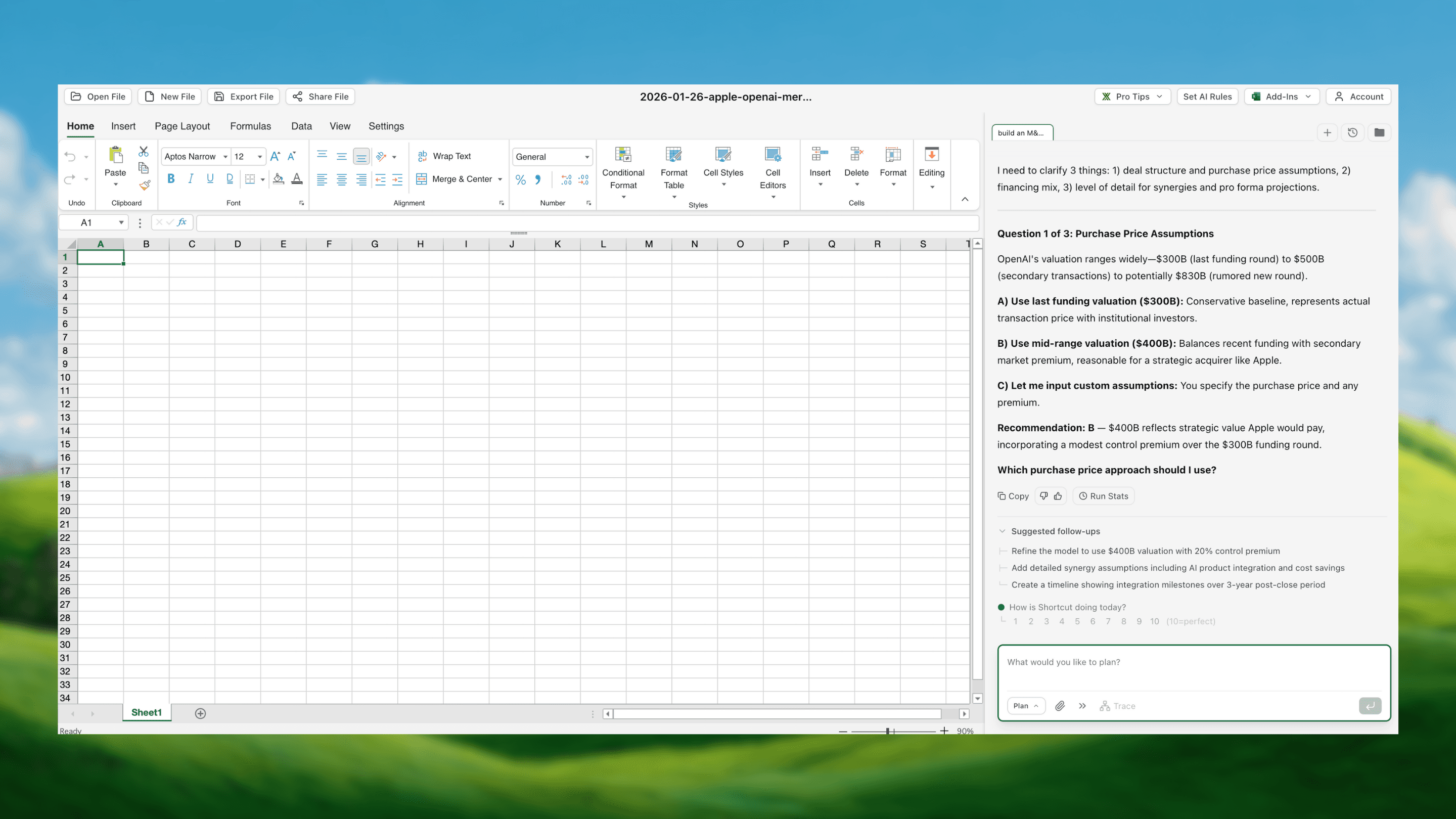
Example: Creating an M&A model for Apple acquiring OpenAI
Multi-Chat and Persistent History for Long Working Sessions
Complex spreadsheet projects span days, weeks, or months. Shortcut preserves your complete chat history across sessions, so you never lose context or have to re-explain your work.
- -Multiple concurrent chats per workbook—work on different sections or tasks in parallel
- -Full conversation history preserved indefinitely—pick up exactly where you left off
- -Context carries forward: the agent remembers your preferences, past decisions, and established patterns
- -Claude starts fresh every session—you lose all context and must re-explain your workbook each time
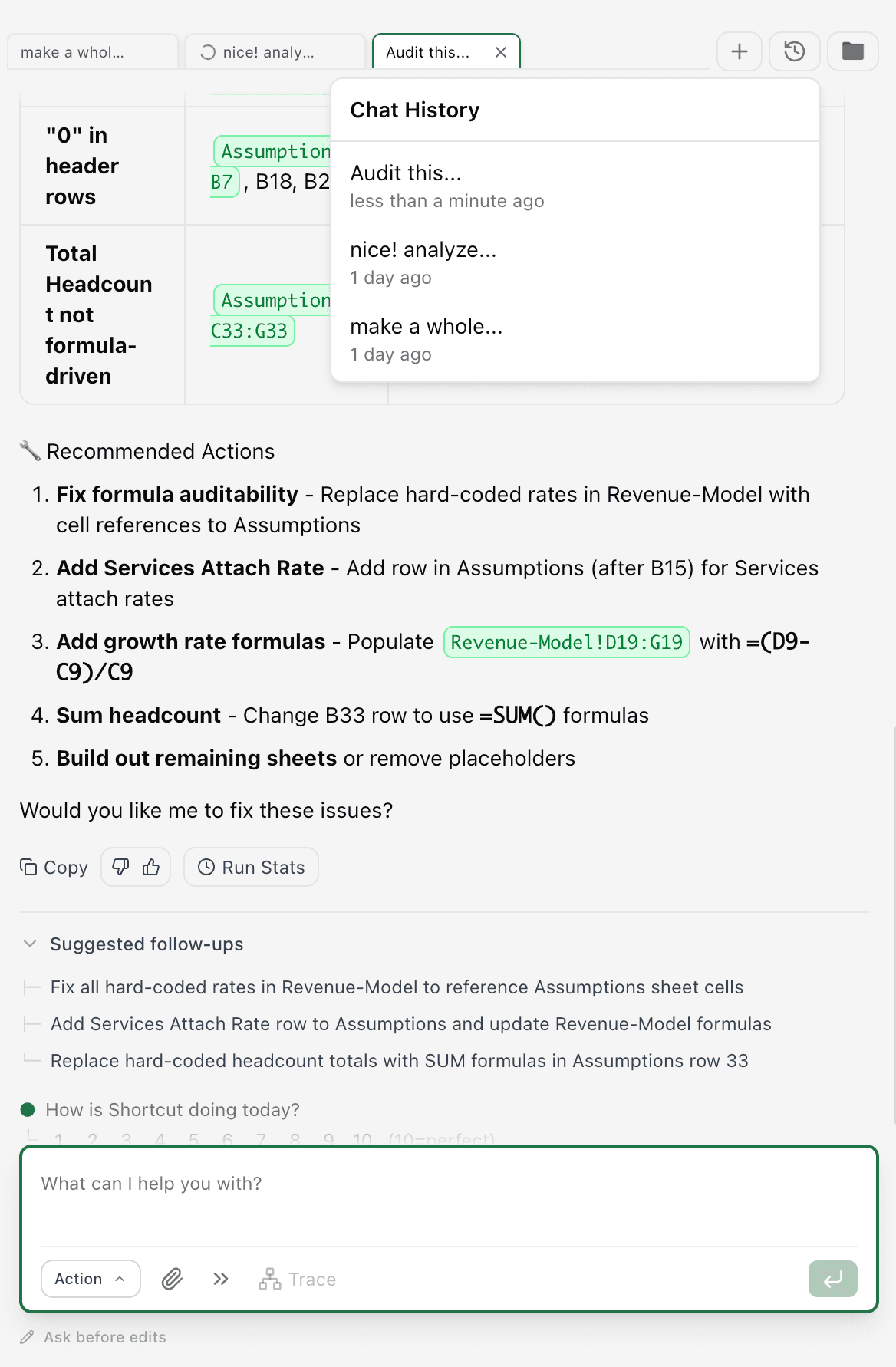
Multiple chat threads with full history preserved across sessions
Web, Google Sheets, and Excel Native Support
Shortcut meets you where you work. Whether you're in Microsoft Excel, Google Sheets, or our web app, you get the same powerful AI agent with consistent capabilities across every platform.
- -Native Microsoft Excel add-in—work directly in your existing Excel environment
- -Full Google Sheets integration—same power for teams on Google Workspace
- -Web app for quick tasks—no installation required, works from any browser
- -Seamless file handling across platforms—upload Excel files to web, export Google Sheets to Excel
- -Claude requires copy-pasting data or manual file exports between platforms



Advanced Charting via Python
Scientists and engineers use Python for world-class analysis\u2014so we gave Python to Shortcut too. Build publication-quality dashboards, Monte Carlo simulations, and statistical visualizations directly from your spreadsheet data.
- -Generate Nature-quality charts and dashboards from your Excel models
- -Run Monte Carlo simulations, sensitivity analysis, and statistical distributions
- -Python executes only when explicitly requested—you stay in control
- -Claude has no Python execution capability for spreadsheet visualization
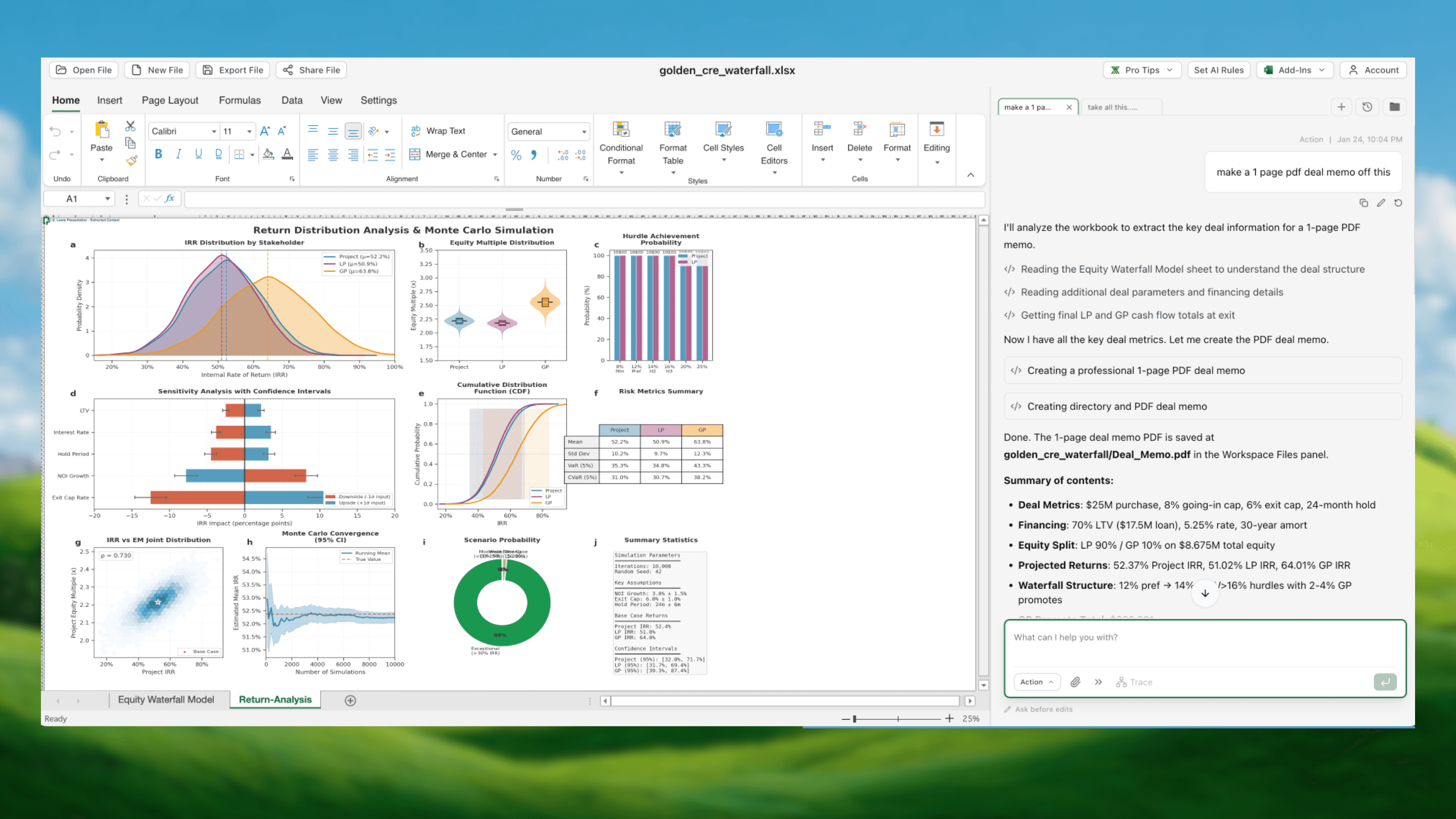
Publication-quality dashboard for a Corporate Real Estate Investment model\u2014built with Python in Shortcut
Beta API Access for Automations and Platform Building
Shortcut isn't just a tool\u2014it's a platform. Our API lets you build automations, integrate with your existing systems, and create custom workflows that run Shortcut's AI agent programmatically. I built a DCF app that takes any stock ticker and gives you back a complete DCF model\u2014using our API and Claude Code in under 15 minutes.
- -Full API access to run Shortcut programmatically on any spreadsheet
- -Build automated pipelines that process files on a schedule or trigger
- -Integrate with your existing tools: Zapier, Make, custom scripts, and internal systems
- -Create custom applications powered by Shortcut's spreadsheet intelligence
Sample app: Enter any stock ticker, get a complete DCF model. Built with Shortcut API + Claude Code in <15 minutes.
Our Take
We have tremendous respect for the Anthropic team. Among the growing field of AI spreadsheet tools, they're clearly the next best option.
That said, for professionals who spend their days in spreadsheets—analysts, consultants, finance teams—the differences matter. The nuances of accuracy on complex extractions, the depth of audit trails, the ability to handle large files and build repeatable workflows are baseline requirements.
We built Shortcut for exactly this audience. Every capability reflects years of working alongside the most demanding spreadsheet professionals in the world. For that use case, Shortcut is the clear choice.