Credit Card Payment Calculator
Find the fastest, cheapest way to pay off your credit card by comparing three payoff strategies side by side.
About the Credit Card Payment Calculator
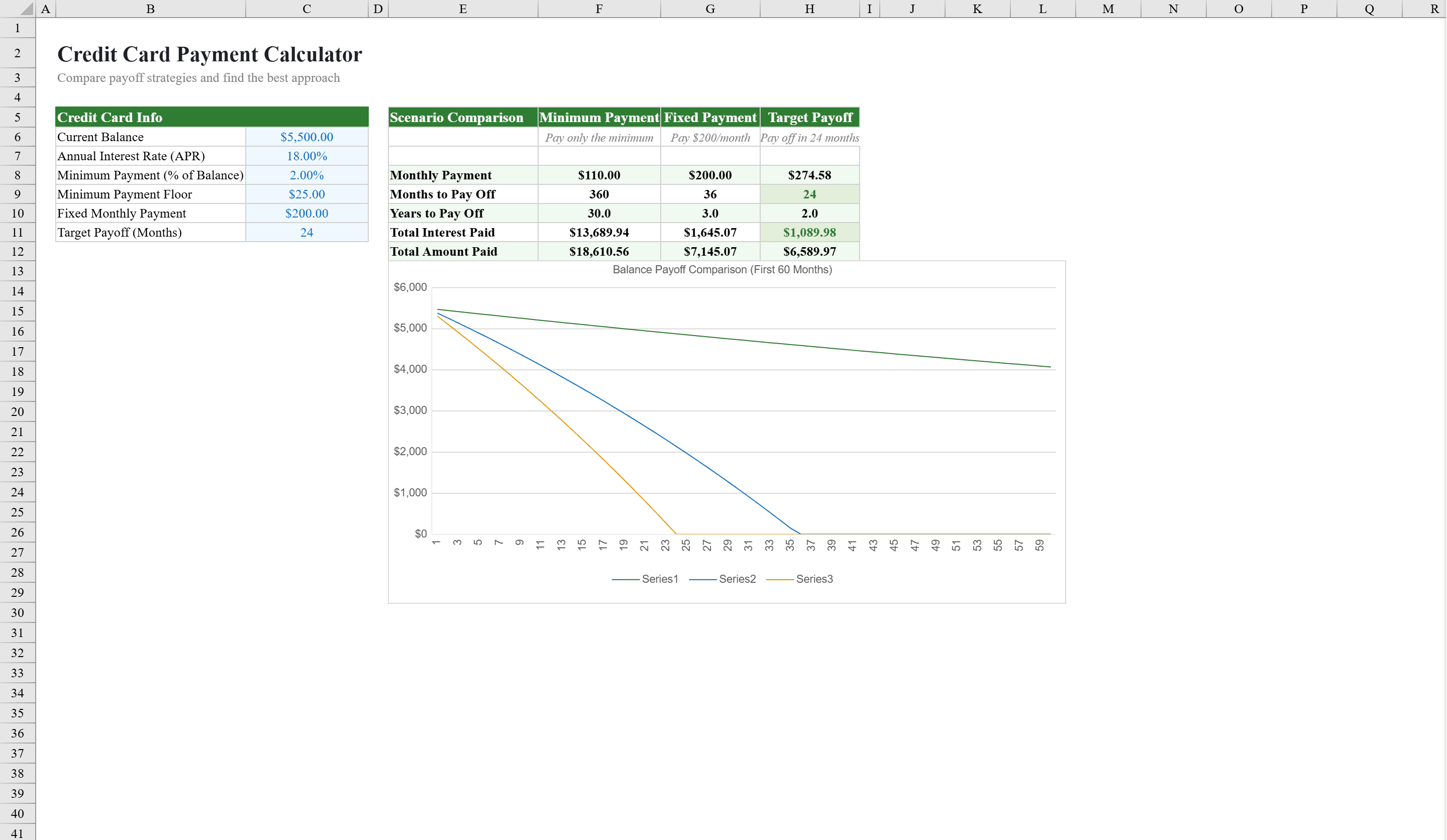
This credit card payment calculator helps cardholders and financial planners compare three payoff strategies side by side: minimum payments, fixed monthly payments, and a custom target payoff timeline. Enter your balance, APR, and payment preferences, and the workbook instantly calculates total interest, months to payoff, and total cost for each approach. A built-in line chart visualizes balance reduction over the first 60 months, while conditional formatting highlights the cheapest option. Once your debt is under control, use the Budget Calculator to redirect freed-up cash toward savings. The full 360-month amortization schedule on the Payment Schedule sheet shows every payment broken into principal and interest components.
Credit Card Payment Calculator Features
- Three payoff strategies: minimum, fixed, and custom target timeline
- Total interest, months to payoff, and total cost for each approach
- Line chart visualizing balance reduction over 60 months
- Conditional formatting highlighting the cheapest option
- 360-month amortization schedule with principal and interest breakdown
How to Use This Credit Card Payment Calculator in Excel
- 1
Enter card details
Input your current balance, APR, and payment preferences for minimum, fixed, and custom approaches.
- 2
Compare strategies
Review total interest, months to payoff, and total cost calculated for each of the three payoff strategies.
- 3
Visualize payoff
Use the line chart to see how your balance reduces over 60 months under each approach.
- 4
Review amortization
Check the 360-month Payment Schedule sheet for a detailed breakdown of principal and interest per payment.
Credit Card Payment Calculator FAQ
- What payoff strategies does the calculator compare?
- It compares three strategies side by side: minimum payments, fixed monthly payments, and a custom target payoff timeline, showing total interest and cost for each.
- How long is the amortization schedule?
- The Payment Schedule sheet provides a full 360-month amortization schedule showing every payment broken into principal and interest components.
- Does it show which option saves the most money?
- Yes, conditional formatting highlights the cheapest payoff option, and the line chart visually compares balance reduction across all three strategies.