401k Calculator
See how employer matching and compound growth build your retirement nest egg over time.
About the 401k Calculator
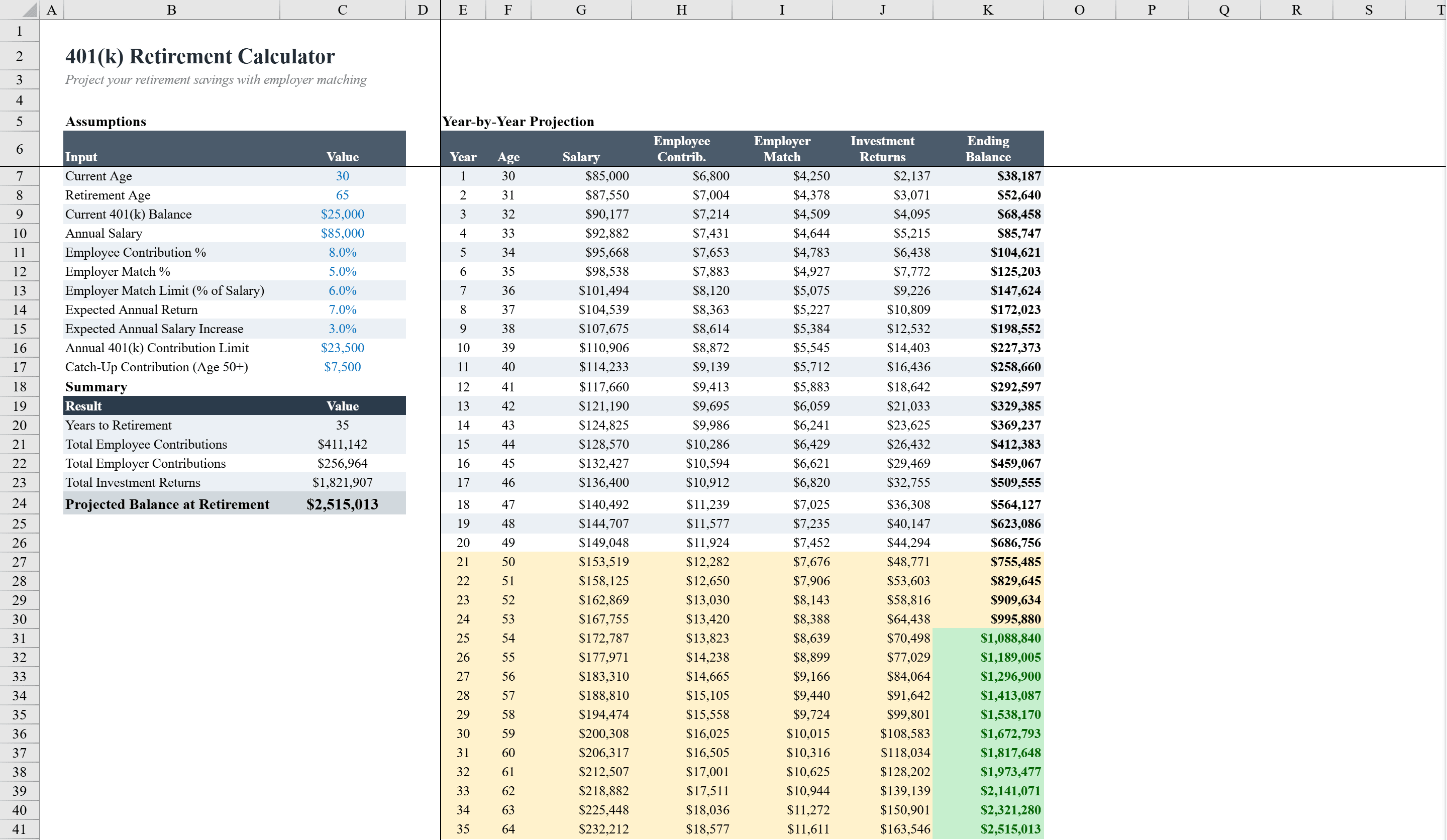
This 401(k) retirement calculator projects your retirement savings growth over a 35-year career. Enter your current age, retirement age, starting balance, annual salary, contribution rate, employer match percentage, and expected investment return, and the spreadsheet generates a detailed year-by-year projection showing employee contributions, employer matches, investment returns, and cumulative balance. Conditional formatting highlights when your balance crosses the million-dollar milestone and flags catch-up contribution years after age 50. A stacked bar chart displays annual contributions and returns by age. Data validation ensures all inputs stay within reasonable ranges, making it ideal for employees planning their retirement strategy. For a broader retirement picture, explore our retirement calculator or model investment growth with the compound interest calculator.
401k Calculator Features
- 35-year year-by-year projection of retirement savings growth
- Employee contributions, employer match, and investment returns tracking
- Conditional formatting highlights million-dollar milestone and catch-up contributions after age 50
- Stacked bar chart displaying annual contributions and returns by age
- Data validation ensures all inputs stay within reasonable ranges
How to Use This 401k Calculator in Excel
- 1
Enter personal details
Input your current age, retirement age, starting balance, and annual salary.
- 2
Set contribution parameters
Enter your contribution rate, employer match percentage, and expected annual investment return.
- 3
Review year-by-year projections
Examine the detailed table showing employee contributions, employer matches, investment returns, and cumulative balance for each year.
- 4
Analyze the growth chart
Use the stacked bar chart to visualize how contributions and investment returns compound over your career.
401k Calculator FAQ
- Does the calculator account for employer matching?
- Yes, you can enter your employer match percentage and the calculator separately tracks employer matches alongside your own contributions in the year-by-year projection.
- How does it handle catch-up contributions?
- Conditional formatting automatically flags years after age 50 when you become eligible for catch-up contributions under IRS rules.
- How far out does the projection go?
- The calculator projects retirement savings growth over a 35-year career, with a year-by-year breakdown showing cumulative balances at each age.