Introducing ShortcutXL: Our Generalist Desktop Agent
ShortcutXL releases your agents from the Excel add-in side panel, so you can choose to expand Shortcut's workspace to include source files, team folders, data rooms, databases, providers, APIs, and live Excel.
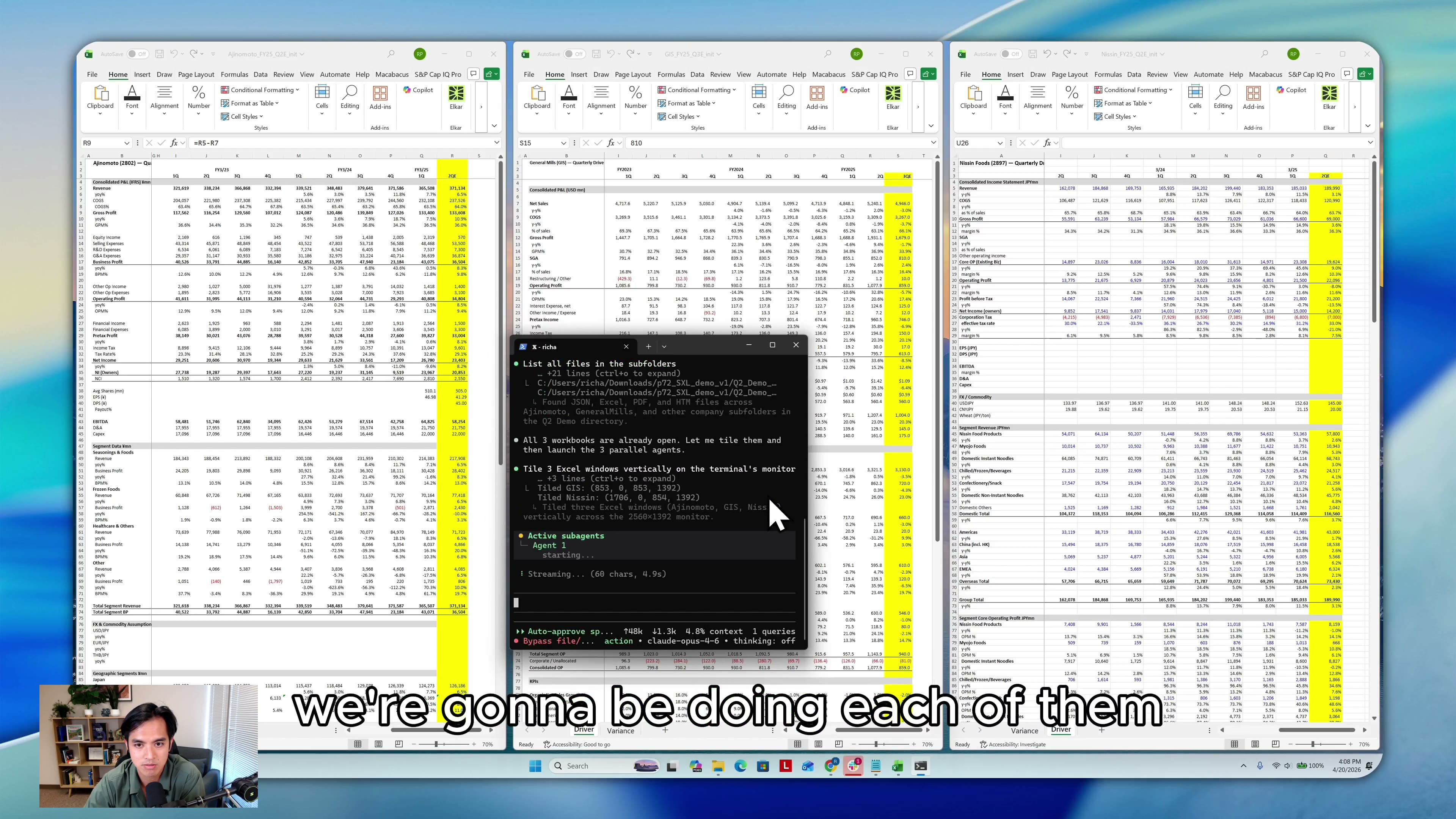
Demo: live Excel models updated in parallel from source documents.
Watch on XAn Excel-native agent for models, source files, and repeatable finance workflows.
Finance work rarely lives in one workbook. The source data is scattered across PDFs, workbooks, CSVs, screenshots, data rooms, IR pages, team folders, databases, and provider exports. The final output still depends on native Excel features that no current agent, whether a generalist agent or a spreadsheet side-panel agent, can reliably touch.
ShortcutXL closes that gap. It works inside real Excel, uses the local or connected context you choose to provide, and stays out of the constrained side panel experience.
Connected Context, Not Just Workbook Context
ShortcutXL is not limited to the workbook in front of it or the files already on your desktop. It is built for connected finance workflows: local folders, data-room exports, IR pages, APIs, and the providers your team already uses.
When a workflow needs authenticated data, you can provide access through an encrypted auth flow where Shortcut never has access to your credentials. From there, the agent can write the code it needs to pull approved source data into Excel, then start modeling, processing, reconciling, and updating the workbook.
For a PE associate, that can mean bringing CIMs, QoEs, lender decks, portfolio KPIs, data-room exports, and IR-page data into an LBO or portfolio model. For an FP&A team, it can mean pulling ERP, CRM, billing, or HR exports into a forecast, monthly reporting pack, or board deck without turning the model refresh into a file-hunting exercise.
Native Excel Features Finance Teams Depend On
Side-panel agents can read cells and write formulas. General coding agents like Codex or Claude Code can reason over files. But they are not built to update a live Excel workbook with the full desktop Excel surface available.
Most spreadsheet automation either lives inside a constrained side panel or works through file-level libraries that miss native Excel behavior. ShortcutXL works with the live workbook and the surrounding desktop workflow, so the agent can handle Excel features that normally sit outside an AI tool's reach.
- -Native data tables for forecast sensitivities, margin scenarios, and board-pack assumptions.
- -Goal Seek for IRR targets, leverage cases, and forecast outputs that need to solve to a target.
- -VBA macros for buttons, scenario toggles, and reporting workflows finance teams already use.
- -What-If Analysis tools that update the live model instead of a copied spreadsheet.
In the LBO demo, ShortcutXL reformats a sensitivity table, uses Goal Seek around an IRR target, and drives bear, base, and bull cases through VBA scenario buttons that flow through the income statement.
The same workflow applies to forecast refreshes, monthly reporting packs, and scenario updates where formulas, formatting, and source traceability matter.
Parallel Work Across Multiple Models
The most powerful part is parallel work. ShortcutXL can open multiple workbooks, tile them side by side, and assign each model its own agent.
In the launch demo, three agents update three quarterly models at the same time from investor presentations and earnings reports. The source PDFs are in Japanese. The output is reviewable: last quarter updated, formatting cleaned up, hard-coded inputs marked, and cell notes that trace back to the exact source document.
Open the models
Assign each agent
Review updated outputs
Try ShortcutXL Now
Run ShortcutXL across your workbooks, source PDFs, data-room files, exports, and portfolio models. Refresh recurring reports, prepare forecast or board-pack outputs, and review the source notes before anything goes into an IC memo, board pack, or partner update.