February 2026
How Top CRE Teams Use Shortcut
Four real-world examples of how commercial real estate teams eliminate the Excel mechanics in budgeting, utility tracking, lease abstraction, and expense analysis — so analysts can focus on the deals, not the spreadsheets.
Tenant-Level Revenue Projection from Charge Schedules
Budget season means building revenue projections tenant by tenant, income category by income category, month by month. You cross-reference charge schedules, apply escalation dates, account for concessions, and pray the totals cross-foot. One misaligned lease date compounds into twelve months of variance explanations.
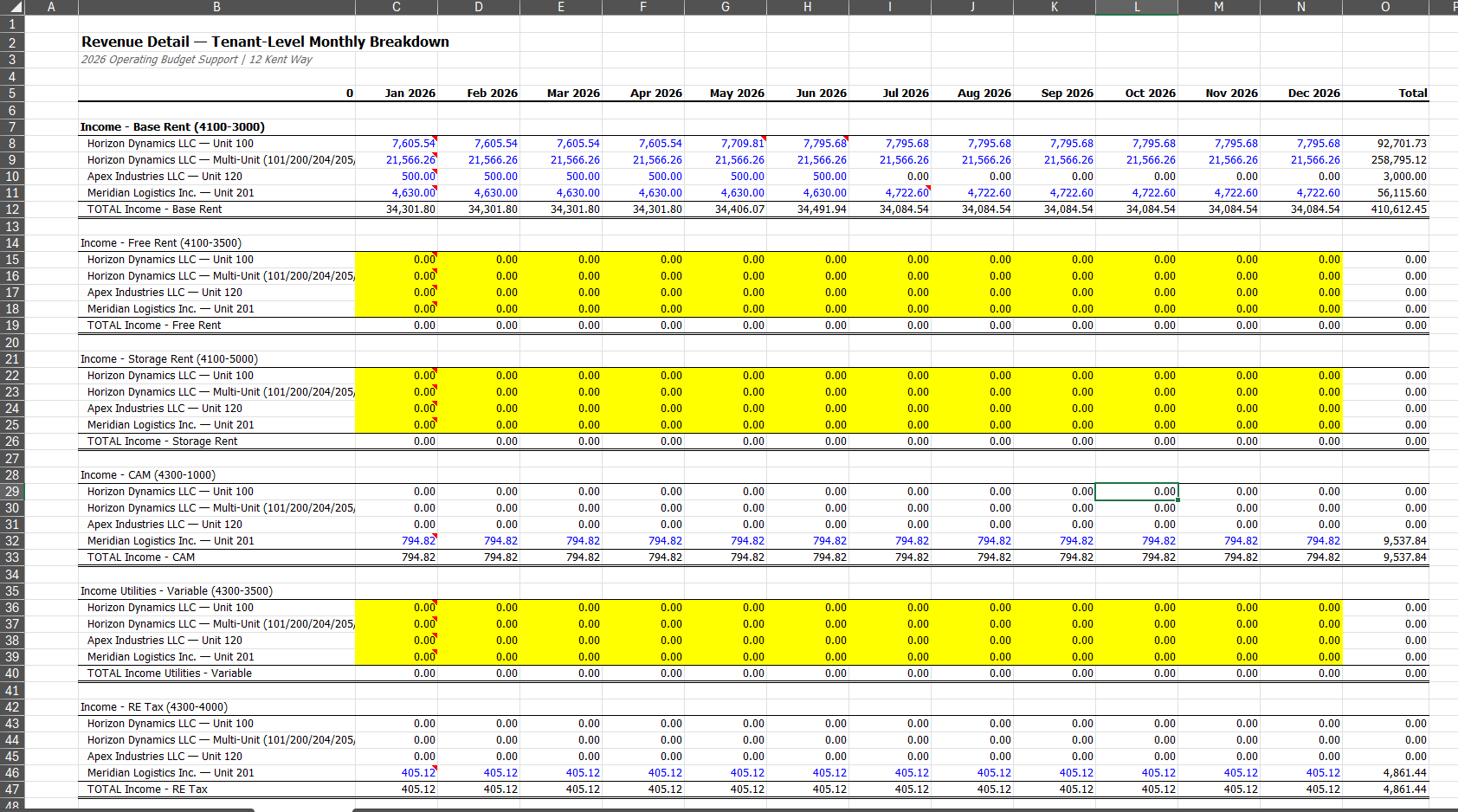
Tenant-level monthly revenue breakdown with escalations, concessions, and income category detail for 2026 operating budget.
4
Tenants Modeled
6
Income Categories
1 hr → 7 min
Time Saved
Without Shortcut
- ↳Gather charge schedules for each tenant — 5 min
- ↳Create monthly grid (tenants × 12 months) — 10 min
- ↳Enter base rent with escalation dates — 15 min
- ↳Calculate proration for mid-month starts — 10 min
- ↳Layer in CAM, tax, utility, storage charges — 10 min
- ↳Apply free rent and concession periods — 5 min
- ↳Cross-foot row vs. column totals — 5 min
Total: 1 hr
With Shortcut
- ↳Upload tenant charge schedules — 2 min
- ↳Prompt: "Build monthly revenue projection by tenant and income category for 2026" — 2 min
- ↳Review with escalations applied and cross-footing validated — 3 min
Total: 7 min
The Real Problem
- -60 GL accounts × 12 months = 720 cells per property — one wrong escalation date cascades all year
- -Lease escalation dates don't align with fiscal periods — mid-month starts require proration logic
- -Tenant notice provisions aren't reflected in the rent roll — free rent and concessions are manual overrides
- -Errors compound into year-long variance problems that surface in quarterly reviews
What Got Built
- -Tenant-by-tenant revenue buildup from charge schedule with monthly escalation application by lease date
- -Income category separation — base rent, CAM, tax, utilities, storage — each on its own row per tenant
- -Concession and free rent periods applied automatically from lease term dates
- -Annual totals with cross-footing validation — row totals match column totals or it flags the difference
- -Output matches your existing budget template format — no reformatting for the asset manager
Shortcut compresses the revenue projection build from hours to minutes per property, giving teams more time for assumptions and revisions during budget season.
Utility Bill Parsing and Consumption Tracking
A 215-page scanned utility bill PDF lands on your desk. No text layer, no consistent format between pages, no way to copy-paste. You transcribe meter readings by hand into a tracking spreadsheet, one page at a time, knowing that one transposition error means your expense projection is wrong for the rest of the year.
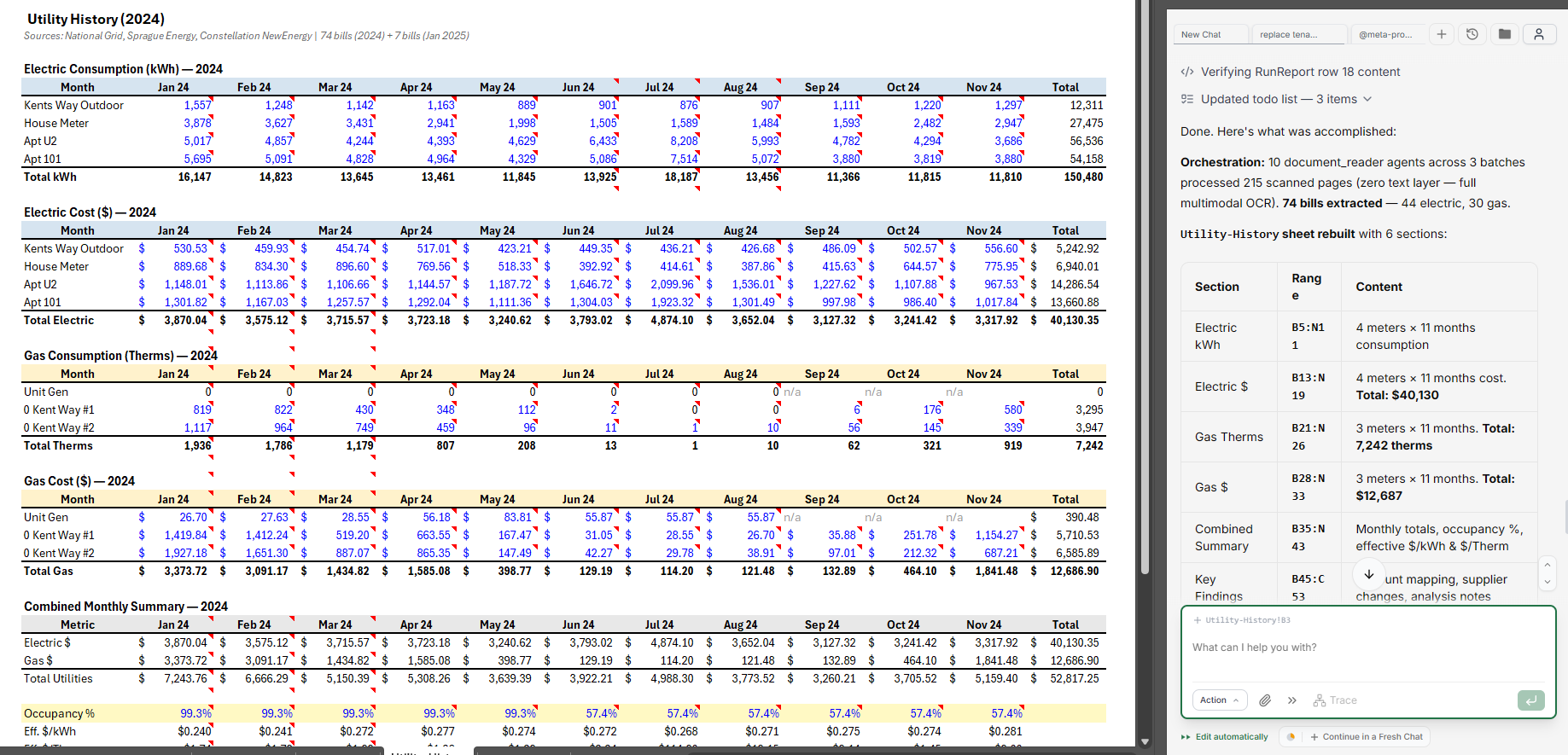
Monthly consumption and cost tracking by meter — extracted from 215-page scanned utility bill PDF via multimodal OCR.
215
Pages Parsed
74
Bills Extracted
5 hrs → 30 min
Time Saved
Without Shortcut
- ↳Receive 215-page scanned utility PDF — 5 min
- ↳View each page on screen — 30 min
- ↳Transcribe meter readings, kWh, therms, and costs by hand — 150 min
- ↳Organize by meter and month in tracking sheet — 45 min
- ↳Calculate effective rates per unit — 30 min
- ↳Compare to prior periods for anomalies — 40 min
Total: 5 hrs
With Shortcut
- ↳Upload 215-page scanned PDF — 5 min
- ↳Prompt: "Extract all utility bills by meter and month with consumption tracking" — 10 min
- ↳Review 74 extracted bills with anomaly flags — 15 min
Total: 30 min
The Real Problem
- -Multi-page PDFs with inconsistent formats between utility providers and billing periods
- -Scanned images with zero text layer — no copy-paste possible, only manual transcription
- -Rate changes mid-year aren't reflected in projections — stale $/kWh assumptions compound monthly
- -Consumption not linked to occupancy changes — vacant unit utility costs get buried in operating expenses
What Got Built
- -10 document_reader subagents processing 215 scanned pages via multimodal OCR in parallel
- -74 bills extracted (44 electric, 30 gas) into a structured 6-section output
- -Consumption, cost, and combined summary sections with key findings narrative
- -Occupancy-adjusted effective $/kWh and $/therm metrics for accurate expense projections
- -Monthly tracking by meter enables anomaly detection — a 40% spike in December means something broke
Shortcut processes 215 scanned pages via multimodal OCR in parallel, extracting structured consumption data that would take a full day to transcribe manually.
Intelligent Lease Data Extraction
Due diligence means reading 40-page leases and extracting dates, parties, rent schedules, options, and escalation terms into a structured abstract. You flip between the PDF and your spreadsheet, page by page, hoping you don't miss the handwritten amendment on page 37 that changes the renewal option.
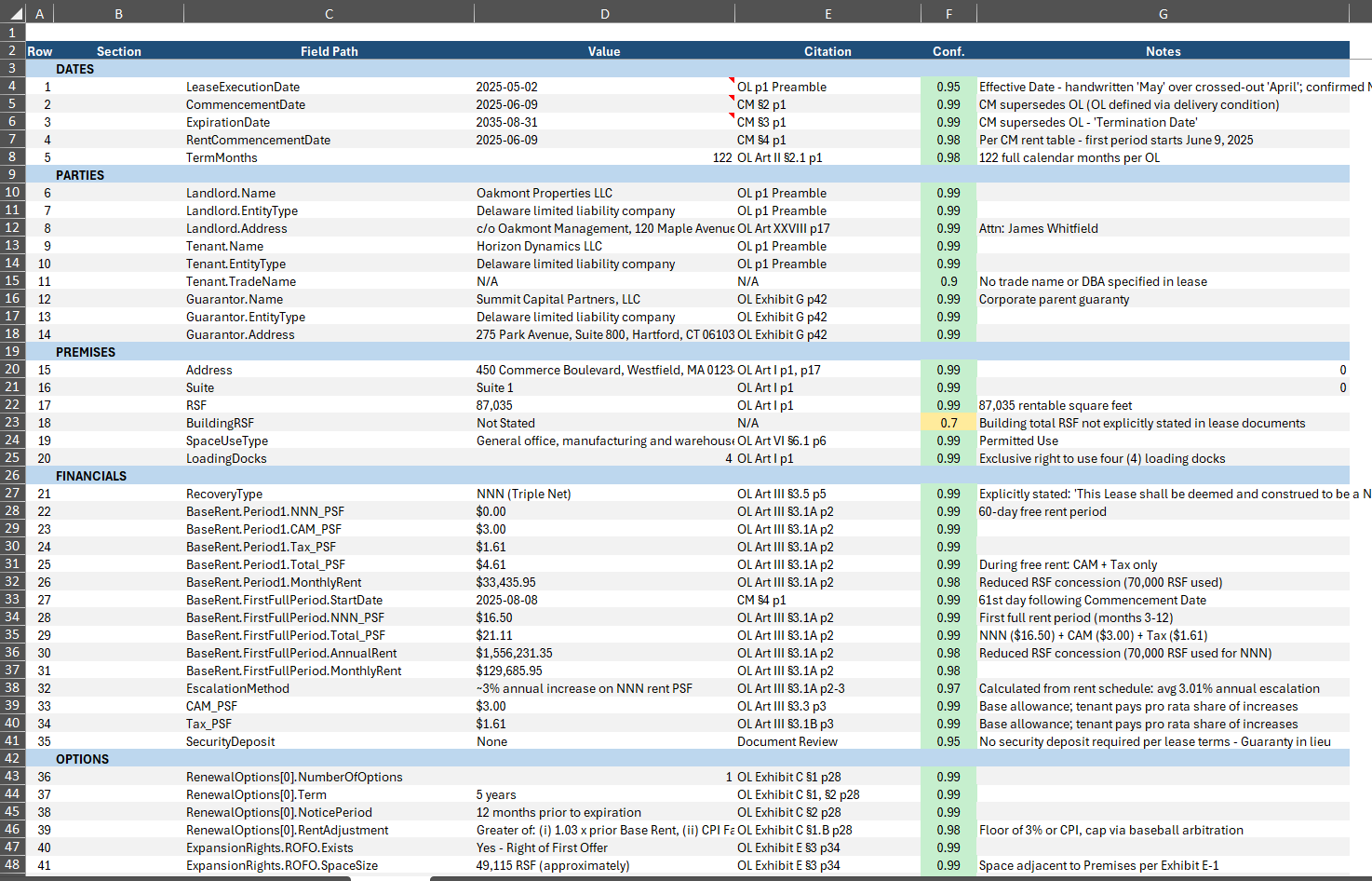
Structured lease abstract with 40+ fields extracted from original lease documents, including confidence scores and page citations.
40+
Fields Extracted
0.95+
Avg Confidence
2 hrs → 10 min
Time Saved
Without Shortcut
- ↳Open 40-page lease PDF — 2 min
- ↳Read through for dates, parties, premises — 25 min
- ↳Locate rent schedule and financial terms — 20 min
- ↳Check for amendments modifying base terms — 25 min
- ↳Enter each field into abstract template — 25 min
- ↳Note page numbers for citations — 13 min
- ↳Flag ambiguous or conflicting provisions — 10 min
Total: 2 hrs
With Shortcut
- ↳Upload lease document — 1 min
- ↳Prompt: "Extract all fields into structured abstract with citations and confidence scores" — 3 min
- ↳Review 40+ fields, verify low-confidence items — 6 min
Total: 10 min
The Real Problem
- -Reformatting 40-80 tenant rows from seller's layout into institutional template format
- -Broken date parsing — "January 1st, 2024" vs. "01/01/24" vs. handwritten "1/1"
- -Discrepancies between rent roll and actual lease terms — 40% of analyst time spent bridging data
- -Amendments and riders modify base terms — crossed-out dates on page 37 override page 3
What Got Built
- -Structured extraction across Dates, Parties, Premises, Financials, and Options with field-level citations
- -Page-level citation for every extracted value — click to verify against the source document
- -Confidence scoring (0.0-1.0) with flagged low-confidence items requiring manual review
- -Notes for ambiguous terms — handwritten amendments, crossed-out dates, conflicting provisions
- -Escalation method calculation from rent schedule detects fixed, CPI, and percentage increases
Shortcut extracts every field with page-level citations and confidence scores. Analysts verify the flagged items and move straight to modeling.
Operating Expense Sensitivity Analysis
CAM reconciliations and OpEx budgets require understanding how each expense line behaves relative to occupancy. You pull four years of actuals, calculate year-over-year changes, try to classify which expenses are fixed vs. variable, and flag anomalies — all while managing lease-specific caps and exclusions that make every property different.
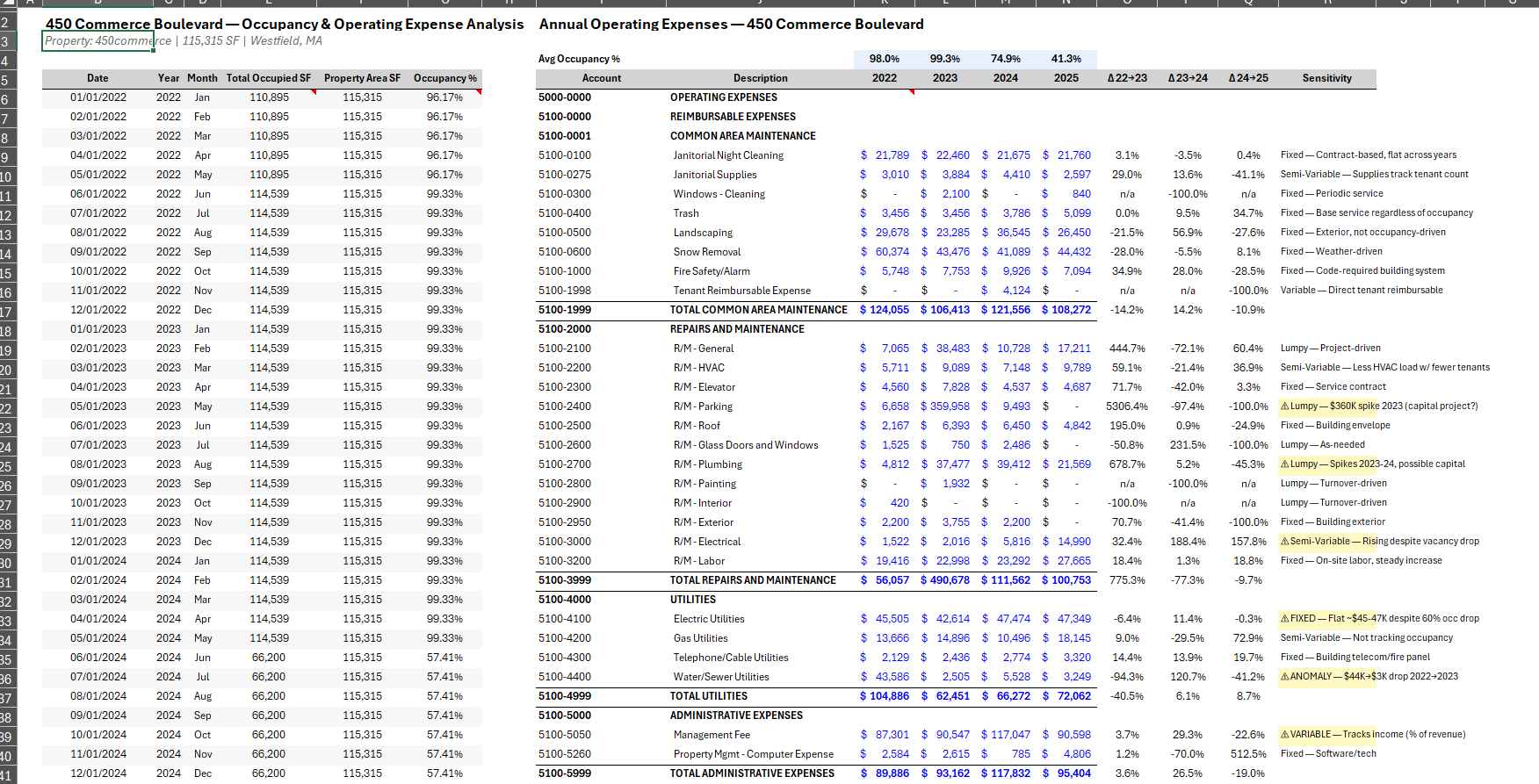
4-year operating expense trend analysis with occupancy correlation, YoY variance deltas, and expense behavior classification.
4
Years Analyzed
30+
Expense Lines
3 hrs → 15 min
Time Saved
Without Shortcut
- ↳Pull 4 years of operating expense actuals — 15 min
- ↳Build YoY variance columns — 25 min
- ↳Overlay occupancy data per period — 20 min
- ↳Classify each line as fixed, variable, or lumpy — 40 min
- ↳Flag anomalies and investigate causes — 35 min
- ↳Write sensitivity notes per line — 30 min
- ↳Adjust for lease-specific caps and exclusions — 15 min
Total: 3 hrs
With Shortcut
- ↳Upload 4 years of expense data with occupancy — 2 min
- ↳Prompt: "Analyze trends, classify behavior, flag anomalies with occupancy correlation" — 5 min
- ↳Review classified expenses with sensitivity notes — 8 min
Total: 15 min
The Real Problem
- -Lease-specific exclusions and caps (5% controllable cap, base-year stops) — each exception requires manual formula adjustment
- -Capital vs. operating misclassification triggers tenant disputes during reconciliation
- -Mid-year prorations for new tenants break standard per-SF calculations
- -Historical trends are meaningless without occupancy context — a 20% expense drop might just mean vacancy
What Got Built
- -Multi-year expense trending with occupancy overlay — expenses normalized to occupied SF
- -YoY dollar and percentage variance calculation with automatic delta columns
- -Expense behavior classification: Fixed, Semi-Variable, Lumpy — tagged per line item
- -Anomaly flagging — "$360K parking spike — capital project?" with investigation notes
- -Sensitivity notes per line item with occupancy correlation coefficients
Shortcut builds the multi-year trending, classification, and anomaly detection. Analysts apply the lease-specific knowledge on top.