February 2026
How Top Accounting Teams Use Shortcut
Four real-world examples of how finance teams eliminate the mechanical drudgery in month-end close, GL consolidation, reconciliation, and budget analysis — without changing their process.

Multi-Entity GL Consolidation
You export general ledgers from multiple entities in different accounting periods. Each uses a slightly different chart of accounts and GL code structure. Every month you manually map lines, aggregate by category, exclude CapEx, and produce a consolidated OpEx summary — all in Excel, all by hand.
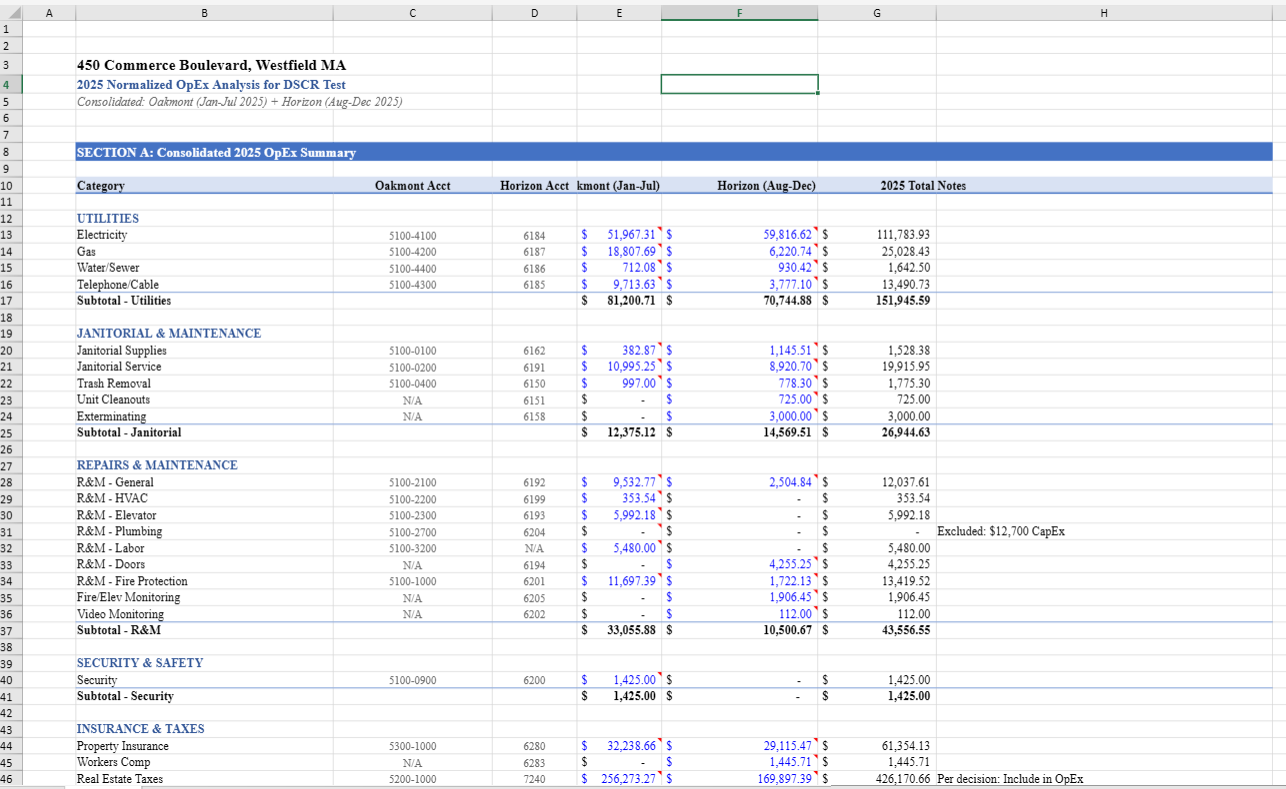
Consolidated 2025 OpEx summary combining Oakmont and Horizon accounting periods with GL-level detail and category subtotals.
2
Entities
60+
GL Accounts Mapped
2 hrs → 10 min
Time Saved
Without Shortcut
- ↳Export GL from Entity A — 5 min
- ↳Export GL from Entity B — 5 min
- ↳Build mapping table for mismatched GL codes — 30 min
- ↳Copy both into consolidation template — 15 min
- ↳Write SUMIF formulas to aggregate by category — 30 min
- ↳Manually identify and exclude CapEx lines — 15 min
- ↳Cross-foot subtotals and verify balances — 20 min
Total: 2 hrs
With Shortcut
- ↳Upload both entity GL exports — 2 min
- ↳Prompt: "Consolidate into OpEx summary by category, exclude CapEx" — 3 min
- ↳Review auto-mapped codes, subtotals, and validation flags — 5 min
Total: 10 min
The Real Problem
- -GL code mismatches across entities — 4-digit vs. 6-digit structures that drift every close cycle
- -Intercompany elimination pairs require matching both sides — one missed offset means the consolidation doesn’t tie
- -Row counts change monthly when new accounts appear — formula breakage cascades through downstream sheets
- -Currency and timing differences between entities compound into unexplained variances at the consolidated level
What Got Built
- -Reads each entity’s GL structure dynamically — no hardcoded row references that break next month
- -Entity aggregation by period with automatic category subtotals (Payroll, Insurance, R&M, Utilities, etc.)
- -CapEx exclusion flagging separates operating from capital items using GL code pattern matching
- -Consolidated balance validation cross-foots entity totals against the combined summary row
- -Output follows your existing management template — no reformatting required
Shortcut handles the mechanical wiring of GL mapping and aggregation. The accounting judgment stays with your team.
Construction Labor Payable Import into Yardi
Third-party labor invoices arrive in inconsistent formats — different column orders, mixed date styles, abbreviated property codes. Yardi's import tool rejects the batch if a single field doesn't match its schema. You spend hours reformatting data that's already correct, just not in the right shape.
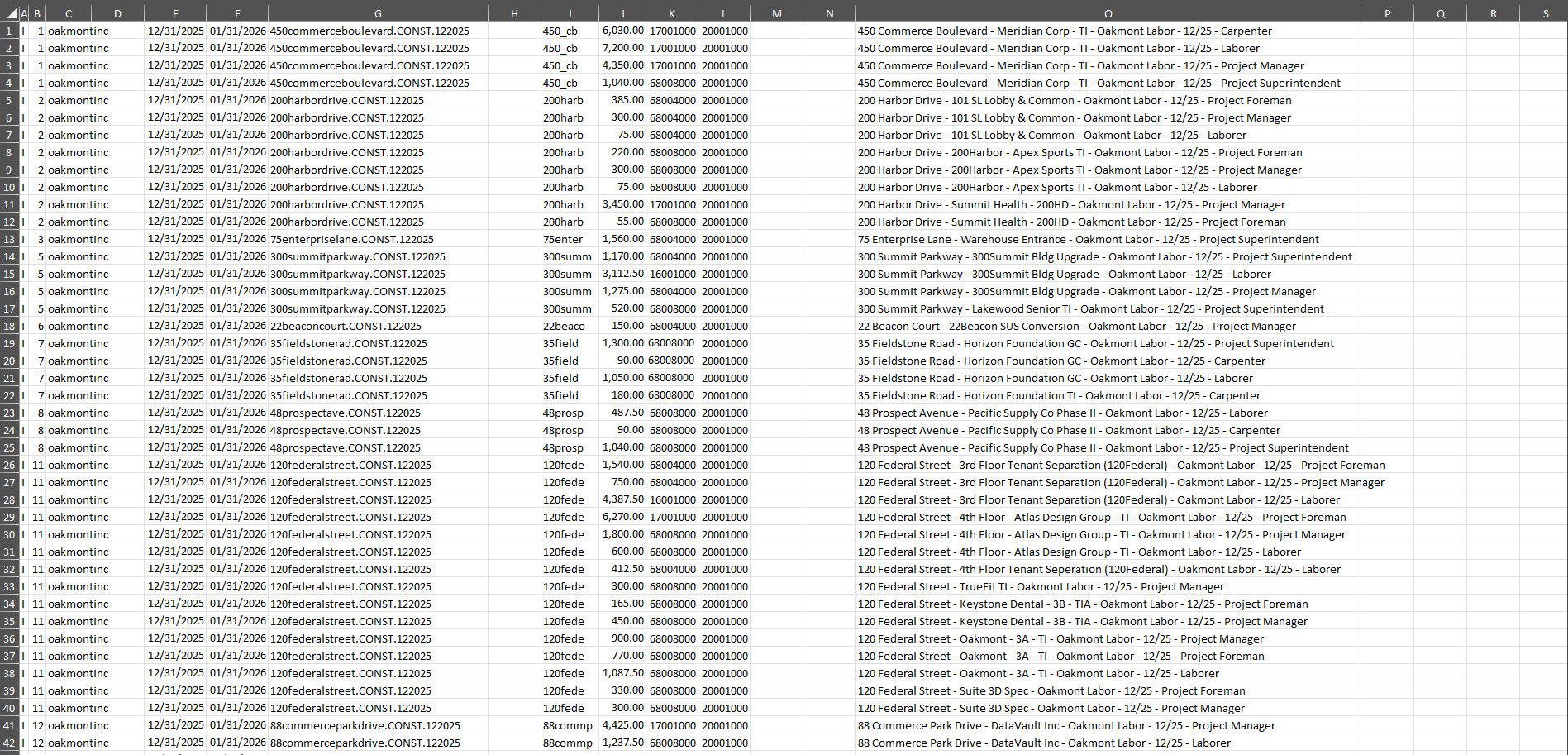
Yardi-ready import file generated from raw third-party labor hour data across 12 properties with job codes, addresses, and validated amounts.
12+
Properties
400+
Line Items
3 hrs → 20 min
Time Saved
Without Shortcut
- ↳Receive third-party labor invoice — 5 min
- ↳Open Yardi import template — 5 min
- ↳Map source columns to Yardi schema one by one — 40 min
- ↳Look up full property codes for abbreviated names — 30 min
- ↳Assign job cost codes per line item — 45 min
- ↳Format dates and amounts to Yardi spec — 25 min
- ↳Test import, fix rejected rows, resubmit — 30 min
Total: 3 hrs
With Shortcut
- ↳Upload raw labor invoice — 2 min
- ↳Prompt: "Reformat into Yardi import CSV with property codes and job cost codes" — 3 min
- ↳Download validated CSV, submit on first pass — 15 min
Total: 20 min
The Real Problem
- -Third-party labor data arrives with no consistent column structure — headers change between vendors
- -Yardi import requires exact column order and format — one wrong field means the entire batch is rejected
- -Property codes use abbreviated names in source data but full Yardi property IDs in the import schema
- -Manual reformatting introduces transposition errors that surface as AP posting exceptions days later
What Got Built
- -Column mapping from raw vendor data to Yardi import schema — handles header variations automatically
- -Property code normalization matches abbreviated names to full Yardi property identifiers
- -Job cost code assignment from labor type descriptions using pattern-based classification
- -Amount formatting and validation against Yardi field requirements before export
- -Output CSV passes Yardi's import validator on first submission — no rejection cycles
Shortcut eliminates the manual reformatting step entirely. Invoices go from raw vendor format to Yardi-ready CSV in one pass.
GL Detail Worksheet Creation from Trial Balance
Audit prep requires detail worksheets for 40-100+ balance sheet accounts. Each follows the same structure — opening balance, activity, supporting detail, closing balance — but pulls from different GL data. You build them one at a time, copying the template, pulling the right GL report, and hoping the balance ties.
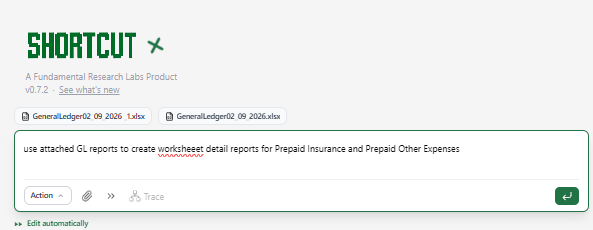
Natural language prompt to Shortcut
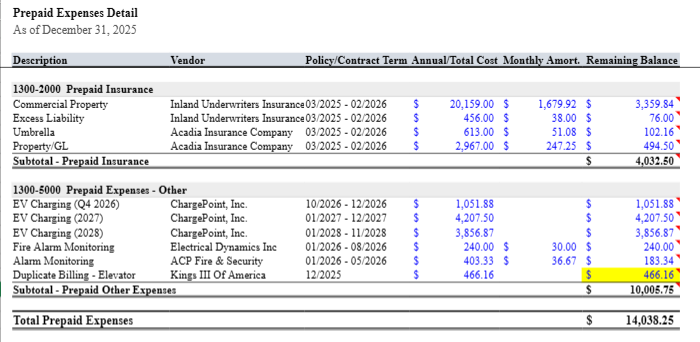
Formatted prepaid detail worksheets with vendor, policy terms, and amortization schedules
6+
Accounts
2
GL Reports Processed
45 min → 5 min
Time Saved
Without Shortcut
- ↳Open trial balance and identify accounts needing detail — 5 min
- ↳Copy worksheet template for each account — 5 min
- ↳Pull GL detail report, filter by date and account — 10 min
- ↳Manually enter vendor names and policy terms — 10 min
- ↳Calculate amortization periods and remaining balances — 10 min
- ↳Verify each closing balance ties to TB — 5 min
Total: 45 min
With Shortcut
- ↳Upload trial balance and GL detail reports — 1 min
- ↳Prompt: "Create detail worksheets for prepaid accounts with amortization schedules" — 2 min
- ↳Review generated worksheets with auto-calculated balances — 2 min
Total: 5 min
The Real Problem
- -40-100+ balance sheet accounts each need detail sheets — same structure repeated with minor variations
- -GL balance must match the trial balance exactly — one transposition means the reconciliation fails
- -Supporting detail from the wrong period is the most common error — date filtering is manual and tedious
- -Each reconciliation isn't hard — there are just 60 of them
What Got Built
- -Template-based detail sheet generation from GL data with automatic account mapping
- -Vendor and policy term extraction populates prepaid amortization schedules automatically
- -Remaining balance computation with monthly amortization periods calculated from policy dates
- -Subtotals by account category with TB cross-reference validation
- -Natural language prompt drives the entire build — no template copying required
No single reconciliation is difficult. Shortcut builds all 60 detail sheets so analysts can focus on the judgment calls.
Budget vs. Actual Variance Commentary
You pull monthly actuals, align them to the budget by GL line, calculate dollar and percentage variances, flag material items, and then write commentary for 50+ accounts. The analysis takes twenty minutes. The spreadsheet assembly and draft commentary take six hours.
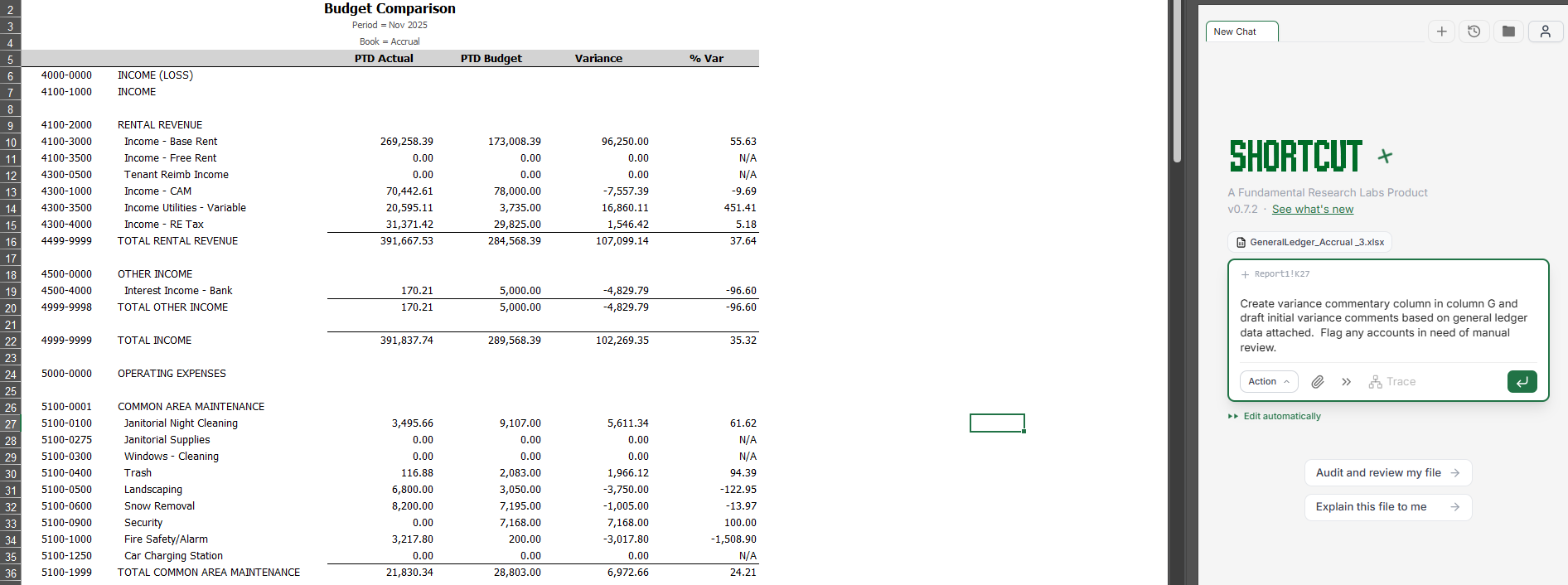
Budget comparison report
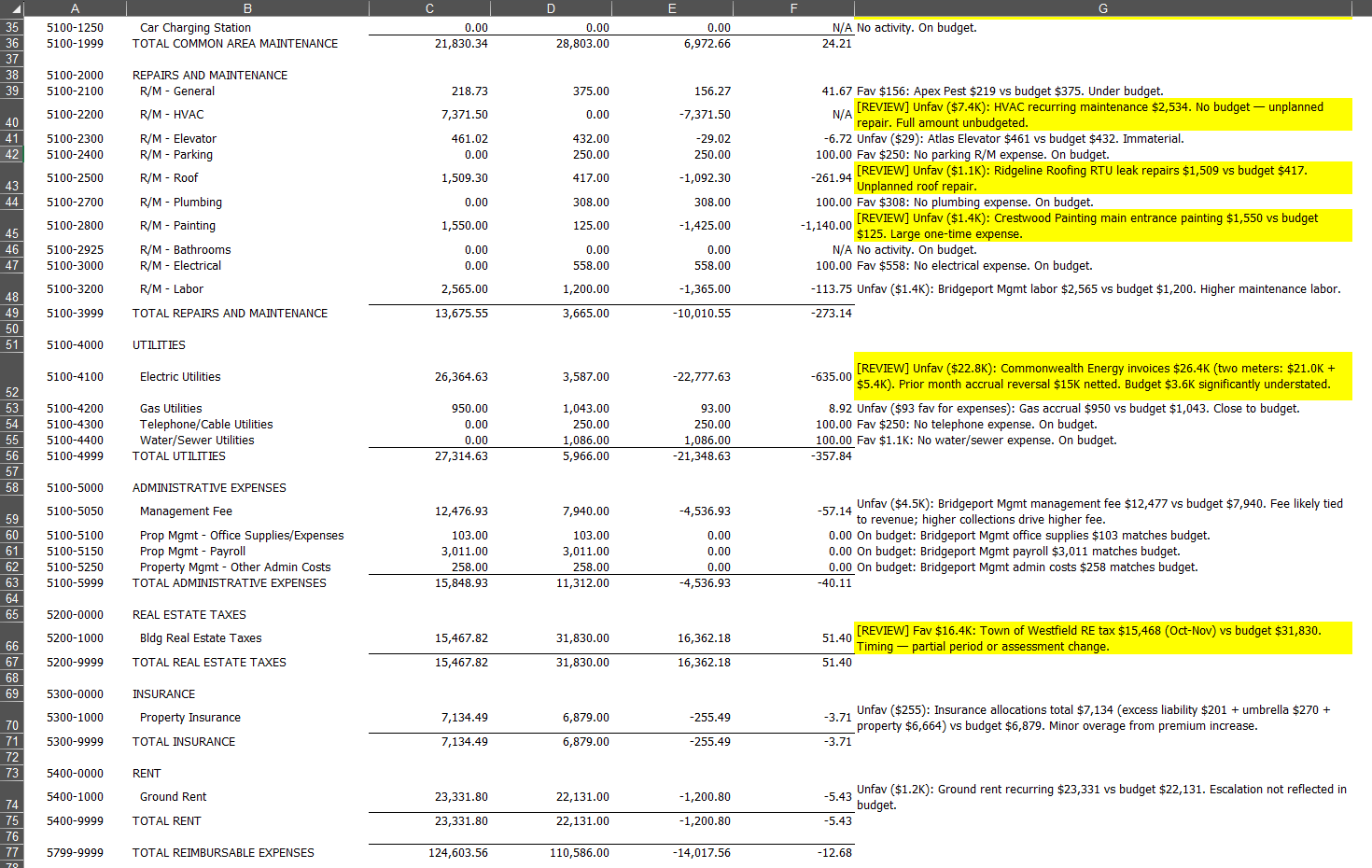
AI-drafted variance commentary with [REVIEW] flags for material items
20+
Accounts Analyzed
7
Flagged for Review
45 min → 5 min
Time Saved
Without Shortcut
- ↳Export monthly actuals from GL — 3 min
- ↳Align to budget by account number — 5 min
- ↳Build variance columns ($ and %) — 7 min
- ↳Apply conditional formatting for materiality — 5 min
- ↳Pull GL detail for each flagged variance — 10 min
- ↳Write explanation for each line — 10 min
- ↳Tag items needing manager review — 5 min
Total: 45 min
With Shortcut
- ↳Upload budget comparison report — 1 min
- ↳Prompt: "Draft variance commentary, flag material items for review" — 2 min
- ↳Review AI-drafted commentary, verify flagged items — 2 min
Total: 5 min
The Real Problem
- -Building the side-by-side layout and wiring variance formulas breaks monthly when the GL export row count changes
- -Investigating 20-40 flagged variances means pulling GL detail for each one to draft an explanation
- -Writing "timing difference" for the 50th time — auditors flag lazy explanations
- -Conditional formatting rules need manual updates when materiality thresholds change
What Got Built
- -Automated variance calculation ($ and %) with materiality threshold flagging and [REVIEW] tags
- -GL-detail-informed draft commentary — not generic, based on actual transaction patterns
- -Conditional formatting applies automatically — red for unfavorable, yellow for borderline, green for favorable
- -Yellow highlight on items requiring manual review with [REVIEW] prefix in commentary column
- -The CFO gets a variance narrative, not a wall of numbers — and you built it in an hour
Shortcut delivers a complete variance narrative with flagged exceptions. The CFO gets the story and the action items in one pass.